|
Adilas.biz Developer's Notebook Report - All to All - (735)
|
||||||
|
|
||||||
|
Photos
|
Time Id | Color | Title/Caption | Start Date | Notes | |

|
Shop 12805 |

|
Meeting with Russell and Abby | 4/15/2026 |
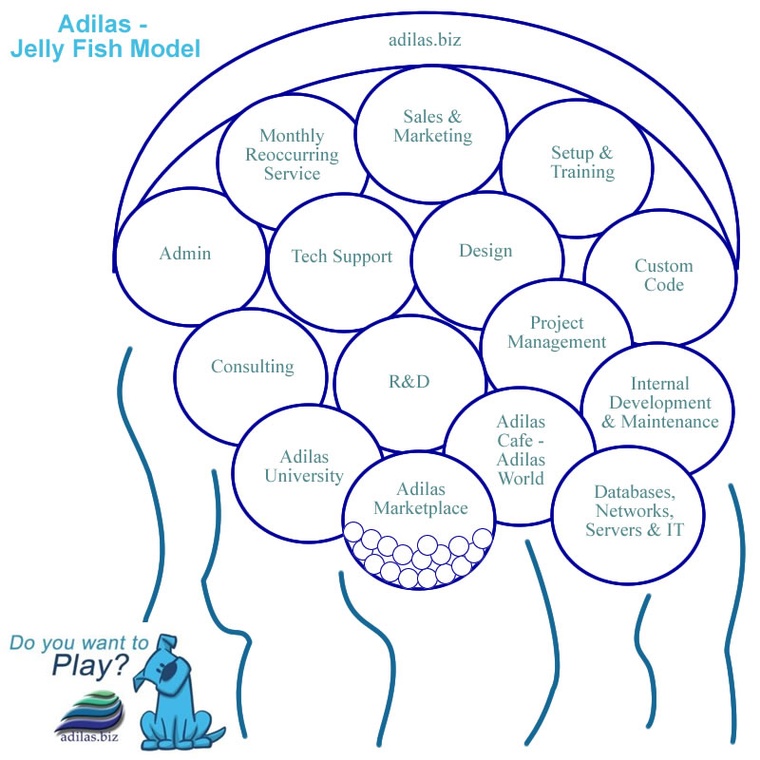
Working with Abby and Russell. Talking about the concept of a platform (adilas) and then supporting and building a floating city on top of that platform (system or application). Russell did a couple of drawings and Abby took some screenshots. The underlying pieces that connect everything are through the platform and/or API socket level connections. We then flipped back into working on JavaScript and CSS for the documentation project. We are trying to detail out the search options. We got the search fixed up. Much better now. Other small changes. Some manual and some AI augmented changes. Good work session. As a side note, Russell and I are helping to train Abby, as much as we can, while working on this project. Lots of little teaching opportunities while debugging, testing, or experimenting. |
|
|
|
Shop 12794 |
|
Meeting with Russell and Abby | 4/8/2026 |
Working with Russell and Abby. Back working on the search look-up for the documentation project stuff. We were deep in indexes and counts to show the correct search results and setup the deep linking correctly (page and subpage navigation). We got stuck on some JavaScript and looping over sections and showing/displaying the correct search results. Manual changes and checking console logs for index numbers and flow. Deep JavaScript debugging. As we are going along, there is some teaching happening and helping Abby understand why we are doing what we are doing. |
|
|
|
Shop 12786 |
|
Meeting with Russell and Abby | 4/1/2026 |
Working with Russell and Abby on the documentation project. Talking about traffic control and helping to regulate flow and usage - the job of developers. Making small changes with AI for small tasks in our project. Some good, some bad. Russell keeps using multiple AIs to improve the prompts for the other AI agent. We got to a point that we decided to manually change some of the code. It took a while to find out what it, the AI, had written. We only got as far as flagging some places to check for next time. We did force some values and got it to work, we just need to be able to either pass those dynamic values or have it recalculate them on the fly. We are dealing with search results and correctly showing and highlighting the correct search results within a page or sub section. The code deals with deep linking, highlighting search text, navigation, and setting the correct search index counters to the correct values (result 1 of 5 or 2 of 10 - etc.). Interesting, we weren't making as quick of progress today. There was a little bit of spinning our wheels - going back and forth with AI. We are in pretty deep. |
|
|
|
Shop 12777 |
|
Meeting with Russell and Abby | 3/25/2026 |
Working with Russell and Abby. Planning and checking existing code on a small project that we are working on together. Slowing moving the ball forward. It takes time. Trying to have it, AI help us, do some code syntax highlighting. It wasn't able to do that. We rolled back the code. We then tried to have it do a text search function on sub HTML pages. That worked pretty good. Working on project prompts, and how to refine and use those. We were working with Russell as he would do a new prompt and then switch between the different AI applications. Talking about assigning tasks and starting a conversation with other developers. The task is not the end all, all it does is start the deeper conversation of what is needed, wanted, required, expected, etc. Working on the search function. Doing some detail work. Good work session. Abby and I are learning tons by working with and watching Russell. |
|
|
|
AU 4042 |
|
Adilas Glossary | 3/25/2026 |
The other part of the adilas glossary (A-J) is on element of time # 4030 in the adilas university site. Web link - time_web_gallery.cfm?corp=371&id=4030 K
L
M
N
O
P
Q
R
S
T
U
V
W
X
Y
Z
|
|

|
Shop 12780 |
|
Phone call with Steve | 3/21/2026 |
Phone call with Steve. We had to play a little bit of phone tag, due to connections. Once we got connected, we had a good conversation. The main things that we were talking about were dealing with removing friction and rub on the client side of the equation. Making things easier and easier. We talked briefly spoke about some current projects like Metrc updates, merchant processing, and CardPointe and Clover server issues and threading. Here are some of my other notes: - One of Steve's biggest goals is to get AI fully integrated into the adilas system. Almost to the point of a simple chat-based system that could handle and process natural language and then be able to help the user do anything inside of the adilas system. Not just navigation, education, training, and consulting, but actual physical tasks. Instead of clicking buttons, navigating, and running reports, you could just talk with the system, and it would be able to help you. That is one of his main goals. It may take some steps to get there, but a cool vision. - Along with the idea above, of a system that could do anything (AI super system), he was talking about a flow process like this... From left to right... Something comes in, it could be a bill, receiving inventory, doing a sales transaction, whatever... The middle would be the chat window and super simple interface (almost nothing structured). You tell the system what you want to do and it helps you do it. If it needs more information, it would just prompt you and help hold your hand. Then on the right, or the output window, you could get your results and/or confirmation that the task was completed. The results don't even have to be reports that we have programmed. It, the output and/or results, could flex, based on what was asked and/or being worked on. - I was expressing that I liked the idea, and I could see how it could really help in some situations. This is just me, but I don't think that every person wants that. Yes, it could be an awesome option and could speed certain things up. However, if it was a repeated process, that would be a pain to keep telling it what to do. It might take longer to explain it than it would to click two quick buttons (from a pre-built interface). There are a lot of assumptions being made. One, it (AI) would have to have a super deep knowledge of the system and all of its possibilities. Someone would have to help set things up. We would need to record those instructions in order to repeat those processes. Things change as time goes by, someone would have to be able to edit things, etc. We would also want it to keep learning on the fly. Technically, each person, even across the same business, would have specific needs. - Without being a "Debbie Downer", I could see something like this being possible as a phase 4 or 5 of working with the AI agents. Phase 1 would be integration and doing simple existing navigation and use of tools. Phase 2 would include education and training on existing pieces. Phase 3 could be where we start letting the AI agent have access to raw data through API's and special AI tooling. Phase 4 we would have to introduce ways of creating some kind of assembly or package for the AI agent to follow (recipe/build type mentality). Then maybe a phase 5 where the system is trained and enabled to help with all kinds of stuff. This could be super deep. Say a person has a picture of something. Do they want to enter it into the system, store info, check something off, etc. It's a little too open right now. This is my take on it... but it would have to be a phase 5 ish type thing. - As Steve and I were talking, we were talking about AI, bots, robots, agents, etc. Steve was saying that they are all combining into just the AI (artificial intelligence). The words bots, agents, etc. may go away. They are somewhat merging (lines are blurring). There is some mixing going on. - I loved his ideas on helping our clients get rid of heavy learning curves, manuals, processes, etc. Decrease the friction and the rub. I love that. It just takes time and money and development (and a plan) to get there. - We talked about the fact that some (most) people don't want to watch a hundred videos or read a huge, big user guide. They want it to be easy. - Some of what we were talking about might even be the next steps (future) beyond the value add-on core model and/or the fracture UI buildout. - Trying to listen to what our clients are saying and telling us. That is important. This came from Russell, long ago - Our clients want something that is easy, powerful, and looks nice. If they can get those three things, it will sell. - I wanted to record these ideas... part of the idea farming stuff that we are doing. We record things, plant them in the ground (sit on them or think about them), and then finally roll around to see if we can make something out of the ideas. Ideally, we get more and more activity on certain things and that helps us know what is being asked for and/or required. Fun process, but it does take time and feedback loops (over and over again). - For me, when I got home, I scribbled down some notes and drew some funnels, mixing of tools, and even possible stacked or reverse funnels. All of this deals with getting something, mixing it together, using possible tools, and then getting an output (of some sort). Sometimes, once you get an output or result, you have to remix it or send it through another funnel to get what you really want. Break it down, transform it, summarize it, expand it, or whatever... some kind of action to either pull, mix, create, and/or alter something. As a note for me, I have some old graphics that I was working on back when I was doing some developer intern training. These guys had to produce something (desired output or a result), but the starting spot varied. They could use tools and then produce the desired output. I might tie back into that concept. - Dealing with the concepts for the developers (listed above - inputs, funnels, mixing, blending, and getting outputs). I found some of the old entries. They were in 2/14/2015 and then again on 3/6/2015. If you want, check out these entries and look at the image galleries for expanded visuals. I also added some of the old handwritten notes and scans to this element of time. These entries also include some concepting on the 3D calendar. All playing through around the same time. Kinda fun. Enjoy! |
|
|
|
Shop 12755 |
|
Meeting with Russell and Abby | 3/18/2026 |
Working with Abby and Russell on the web documentation project. We were doing some code tasks and modifying logos for the new web layout. We were having it (Claude AI) add in some new CSS variables to help with primary colors and highlighting to help tie-in light modes and dark modes better. We added a copy code button to the code block section. This allows us to show something like some text or a code snippet, and then have a quick copy button to help a user copy the content. All of those changes went pretty well. We then tried to get it to help with adding in color coding (syntax highlighting) for the code blocks. It really struggled on that. We just rolled it back and will keep going next week. Fun to see both the successes and the failures. It does take time, but it can also save time, when it works. Fun exercises. |
|
|
|
Shop 12769 |
|
Adilas key Contributors | 3/17/2026 |
Adilas Key Contributors:
Steve Berkenkotter - Main owner and business partner - original ideas, concepts, and training - sales, relationships, dreamer, visionary, custom code, coordinator, builder of the first industry specific skin, and the list goes on. Huge player in the adilas story and timeline. One of the original owners in Moring Star Automotive - where the system came from. There are three known Steve's in the system notes. Most of them are this Steve (99 out of 100 times). He won't admit it, but adilas was his brainchild.
David Berkenkotter - Steve's brother and business partner in Morning Star Automotive. David was a system user and helped us create the adilas quick search. He liked using that feature, the quick search, but it only existed on one page originally. He wanted us to put it on every page. That ended up being in the header. He was also one of the original partners in adilas. Power user in the system. Sadly, he passed away due to cancer.
Shari Olin - Commonly known as "Shari O.". She worked in the accounting department back in the Morning Star days. She has been somewhat of a mother hen to help all of us crazy chickens keep going. She helps with customer support, training, payroll, bill collection, and tons of backend office functions. Major power user. Just being silly, but she can have the mouth of a sailor but the heart of an angel. Part of the adilas admin team and a great friend.
Craig Leitner - Also part of the original Morning Star team. Craig was the automotive floorplan and bank guy. He is a power user in the system and does a lot of bank reconciliation and other tasks. He currently works with Steve and asks as the adilas controller (money flow guy).
Cory Warden - Originally an adilas rep and consultant. Cory become part of the team after being a rep for quite some time. She helps with customer care, client support, project management, and keeping the team on track. She also does all of the news and updates and other training material. Cory does tons of oversight type services for our clients. Power user and part of the admin team.
Sean Carlton - Sean was a manager at a Cannabis dispensary in Colorado that used adilas for years and years until they sold. Steve recruited Sean to help with sales, deployment, and training. Sean brings lots of usage experience. Often, he is one of the helpers if we need to send someone onsite to help with a deployment or training session. Power user.
Brandon Moore - I'm one of the guys that writes most of the developer's notebook entries. Originally, I was hired by Morning Star, the automotive dealership, to help with data entry, accounting, and website stuff. I ended up being one of the main adilas developers and architects. I build content, write code, help other developers and team members, and help with training. Helped start the project back in 2001 under the Morning Star name.
Chris Dunsey - One of the first adilas interns (developers). Helped with a number of projects. Ended up being somewhat of a consultant later on.
Shawn Curtis - Kinda a funny story. He was taking a developer's class at Bridgerland. He knew my brother Russell. He asked to join our developer class and became one of the first interns along with Chris Dunsey. Shawn ended up helping with payroll and other projects. Some of the photo galleries in the system came from Shawn's help. He also worked on the media/content (file upload) pieces. Later on, he did more payroll work and acted as a buddy to Brandon and did some consulting work. We worked together for years and years.
Russell Moore - Russell is my younger brother. Originally, he was added to the group because of his graphic skills. He ended up being a great backend developer and project manager. He has also acted as a trainer and mentor for Brandon along the way. Much of the current system came from projects and efforts that Russell was involved with. He has also been Brandon's AI tutor in recent years. Great help to the system. Huge contribution.
Chris Johnnie - He is an entrepreneur who teamed up with Russell to help create a company called "Adilas For Business" or "AFB". Eventually, both Russell and Chris sold their pieces back to adilas. They were honestly the first ones to really try to run as a white label of adilas. This was back in 2015 and 2016. Chris really helped to push the product to the next level along with Russell's help.
Danny Shuford - Longtime friend of Steve's. Danny helped with some website design, sales, and videos for adilas. He even got into creating custom PDF labels for clients. Light development work.
Marisa Shaw - She is Danny's daughter. Danny brought her to an adilas training event in Denver, CO. Marisa was the star student. She ended up helping with some graphics, flyers, marketing material, teaching, instruction, and planning. Power user. Very helpful.
Shannon Scoffield - Shannon is Brandon and Russell's sister. Her maiden name is Shannon Moore. Huge help and virtual assistant to Brandon. She has helped with training, project management, and content creation. Most of the major content sessions were or have been with Brandon and Shannon working together. When they, Brandon and Shannon, were traveling, Shannon was one of the primary adilas instructors. If she was teaching Brandon was taking notes. If Brandon was teaching, Shannon was taking notes. Power user.
Cheryl Moore - Cheryl is my mom. What an asset. She owns a small business and has owed a few different ones. When we were doing training sessions, she came to every one of them. She asked wonderful questions and was a great supporter. Sometime, I would use her as a test subject - can my mom do this? If yes, we are good. If not, we may need to keep tweaking it. Thanks mom!
Wayne Moore - Wayne is my dad. He was my hiking buddy and more than willing to talk about ideas and concepts on our walks and hikes. He helped out with video stuff and was a great coordinator for making other connections. He worked at Bridgerland (technical college) and helped us get setup with classrooms, computer labs, and other great connections. Huge cheerleader! There is another Wayne, Wayne Andersen, he is a backend developer, systems guy, and database guy.
Wayne Andersen - This Wayne lives in Portugal and helps with all of the backend security, server, and code testing. Major skills, writes code, helps push all of us to new technologies, partially retired but loves to play with tech stuff. If you search for Wayne and it deals with concepts and coordination stuff, that's my dad, Wayne Moore. If you search for Wayne and it sounds like a master backend guy, that's Wayne Andersen.
Alan Williams - One of the lead developer's at adilas.biz. Alan joined us in 2015 and quickly came up through the ranks. Trainer, CTO, team lead, master developer, prototyper, and system architect. Alan has helped with many projects and features over the years. He also helped Brandon with some of the prep work for the adilas lite (fracture) plans and project. Sometimes called "Dr. Alan" by the other developers. Example: This might be a project for Dr. Alan.
Bryan Dayton - Bryan has been one of the most versatile guys on our team. Originally, he joined a development class out of curiosity. He and Brandon live in the same town and know each other from church. Bryan has done more custom code or small system projects than almost any other developer. He also joined the team in 2015. He helps with sales, custom projects, pushing on projects that he thinks will yield a return. Lots of work on the adilas lite and fracture project. Very hard working and versatile.
Dustin Siegel - Developer who helped with numerous cannabis and cultivation type projects. He worked directly under Steve to help with that business vertical. Many of the original pages that Steve built were taken over and remade by Dustin.
Eric Tauer - Developer and custom code guy. Originally, Eric knew Steve and lived in Salida, CO. As a note, adilas is Salida spelled backwards. Eric has a background in database work and data warehousing. Eric has done tons of custom systems for clients. Often, Eric would pioneer certain features or logic, as custom code, and then we would bring those features into the main adilas application.
Garrett Kirschbaum - Adilas intern and then full developer back in 2015. Stressful time of building and expansion. He and others helped run the adilas shop with Brandon's help. Garrett was a great developer and helped us standardize a number of tools and features. He was the first developer to work on sub inventory, back in the day. He also did other projects and helped with some developer management stuff.
Charles or "Chuck" Swann - Charles was an instructor at Bridgerland for web development. He builds custom websites, does amazing mock-ups, prototypes, and is a CSS master (styling a website using code). Chuck worked with Russell to help with redesign work, projects, and vision. Chuck worked fulltime for a number of years and now works and coordinates work done by a small hand-picked design and development team. Anything that needs some design loving gets passed over the Chuck and his small team.
Steve McNew - Friend of Steve Berkenkotter's. This Steve helped prep some whitepaper documents to help with getting adilas standardized and some internal audit type stuff. Mostly white papers and putting things down on paper. He ended up getting hired by the local school district and wasn't able to finish the process, but he got it started. He asked some great questions, and we had some good conversations.
Abby Elkins - Abby is Brandon's daughter. Her maiden name was Abby Moore. Abby, when she was little (10-12 years old) helped with some of the original concept artwork for adilas. Later on, she helped with content for the presentation gallery and then the adilas lite plans (fracture). Currently, she is working graphic artwork for different adilas pages. She's now in her mid 20's and has some awesome art and content skills.
Aspen Moore - Aspen is Abby's younger sister and Brandon's daughter. Aspen helped Brandon with some planning and counseling (mental help). Aspen also did some general business consulting with her dad Brandon.
John Maestas - Developer, backend server guys, and designer. John came to us through Dustin. John was uses as a jack of all trades on the backend and frontend. He did numerous projects, documentation, payroll, and page redesign projects. John was also very help to Brandon in working on the notes and comments on the SWOT analysis document. Many other projects as well. Good vision of the future.
Kiva Berkenkotter - Steve's wife. She helped Steve with various projects and planning sessions. At one point, she was in charge of paying commissions and collecting monthly reoccurring payments. Huge supporter to Steve!
Heather Moore - Heather is Brandon's wife. What a trooper. Cheerleader, support, ideas, and consulting. Huge asset to Brandon (me). Thanks Heather!
Jonathan Wells - Designer and mock-up guy. He helped to map out the system and created a number of deep mock-ups for adilas lite (fracture) projects. Great job catching the vision and putting those pieces into a visual representation. We still refer to his work when talking about fracture (future project for adilas).
Jonathan Johnson - Business consultant from Epic Enterprises. Met with Brandon and Steve in end of 2019 into 2020. Really helped us see some needs and opportunities. Later, helped Brandon with some other consulting when trying to define the fracture plan.
Calvin Chipman - Windows software developer. Calvin also did a bunch of web-based work, database stuff, label printing, and API socket stuff. Calvin was the first developer to use the adilas API's to create a native mobile app for a client. He also built a number of special developer tools used by some of our team to speed things up. He's the tool guy!
Cody Apedaile - Bryan Dayton's cousin, Cody helped with a bunch of JavaScript code and changes. He also spent some time working on the UML diagram for the adilas database. We didn't get things finished, but he was working on a new build your own interface (custom to you) for adilas. We ran out of funding. We want to get back to that project at some point.
Dave Forbis - Dave was the official "high tech gofer". He did a bunch of things. Graphics, project management, brainstorming, planning, sales, and helped with managing developers for the adilas shop. He was another great student. He came to a number of training courses and brought so much to the courses. He was also a big support to Brandon during some rough times.
Josh - There are three Josh's. Josh Wheeler, Brandon's friend and developer. Josh Sagert, developer and adilas user (worked tons on the discount engine), and Josh White, Steve's friend from California. Josh White has brought us a number of bigger leads and bigger players, like franchises, and other higher-end clients. Anything recent is Josh White, from California. He helps with networking, sales, and dreaming of new things.
Suzi Distelberg - Sales, training, and deployment. She also worked with some custom projects and doing step-by-step user guides. She has helped with all kinds of projects and even gone onsite for setups and training. Great asset!
Kelly Whyman - Kelly is Dustin's wife. Kelly was single handedly the best independent sales rep that adilas had. She did training, consulting, and sponsored a number of custom projects. Kelly helped Steve and Brandon with reports, functionality, and other things. She got so good at things, state contracts snagged her up to work at state and multi-state level stuff.
Molly Hennessy - Molly was another independent sales rep and consultant. She had numerous clients and got into doing SOP's (standard operating procedures) and other high-end documentation and training. Molly was an entrepreneur and even started creating some of her own product and services. If you search adilas on google, some of the other results are from Molly. Super creative and a great consultant.
Hamid Karbasi - Developer - He has worked with Brandon doing small websites, training, and small tasks. He currently is a manager at a retail store and brings some managerial type skills to the table. Willing to talk about concepts and how they apply to retail and other environments. He is also lightly helping with some planning for fracture.
Gene Spaulding - Friend, entrepreneur, and businessman. Gene is an old college friend. We had a number of friends in common. He has been a small mentor to me over the years. Way back, before adilas, he helped me get my first business loan for a project that I was working on.
Sharik Peck - Friend, entrepreneur, public speaker, physical therapist, and businessman. Good influence and mentor in ways. Sharik and I used to exercise together back in the day. Many of fun walk, run, and weightlifting session. Learning some conference and training skills from him and his wife. They have done really well pushing their product lines and doing some marketing. Trying to get some ideas.
Bridgerland Technical College - Use to be Bridgerland Applied Technology College. Not a person, but a huge help. This is a local technical college in the Logan, UT, area. Brandon's dad, Wayne, worked there. Tons of assets. They provided classrooms, training options, computers, and even an small incubation spot (starter office space) for the adilas shop during the startup phase. Huge asset!
McCorvey's Pro Shop - Also known as Bowling World. Client that had multiple locations. The started out with around 30 and grew up to the 90+ location level, all using adilas. Long time client.
Emerald Fields - They were the first client that wanted their own fully dedicated box and server. They had multiple locations and requested some custom code, reports, and features.
Beaver Mountain Ski School - Client that we helped them track their ski school (snow sport) lessons. Students, instructors, classes, and schedules. Custom interface dealing with elements of time and flex grid.
Bear 100 - This was the first event or annual event client that we did. They used the system for about a week each year. They had 350+ runners and their families that would be on the site for multiple days straight. It was a 100 mile running race with 13 aid stations and a small social portal for the family and friends to watch their runners. This one was special as it had custom input options to upload CSV files to populate the database vs normal HTML form field entries. Records were sent in batches from remote places to adilas for storage and race progress.
High Valley Bike Shuttle - Online ecommerce and scheduling client. They also have a cafe and small retail store. Fun online scheduling and bulk flex grid projects.
Herbo - Mike Roundtree, owner of Herbo, was the first company to do a small white label of adilas. Mike has been a great asset to Steve and the two of them have worked on projects, plans, and dreams. Herbo also has a custom payment solution that they are trying to market and get rolling. Mike has been a great supporter for years. He is also a certified CPA and that credential helps us and him. We would like to get other CPA's on board as well. Thanks Mike!
Nxtlinq AI - AI assistant. These guys really pushed us to get an AI agent inside of adilas. Tons of development took place and lots of prep stuff. We wanted to do a 3-part plan for integrating AI. 1. Teach it how to navigate using the AI quick search (check - done), 2. Teach it all things adilas. and 3. Teach it how to be clear up at the consultant type level. We only got the first phase done. Lots of other plans and such, but we ran out of funding.
Grok AI - Steve loves using Grok. He has built a number of image generation options inside of adilas. He is also working with Grok to feed it data to help with analytics and AI insight. This is not finished yet, but we may end up using Grok as an AI assistant inside of adilas. We have simple and emerging connections available right now but need to really polish things up before going live with the AI assistant options.
ChatGPT AI - We have started using ChatGPT to help with code, explanations, explore resources, planning, and help with training and flow for people and other AI bots. Currently, Brandon, Steve, Bryan, Alan, Josh, Russell, Chuck, and Wayne are using AI in either ChatGPT chat sessions or some other form of AI. We have some using Copilot, Gemini, Claude, etc. AI is actually helping in many ways. ChatGPT is a big one for use. Anyways, they are earning their place in the adilas key contributors list.
There are so many more that I can't list. Developers, users, power users, reps, consultants, trainers, clients, accountants, friends, family, and even critics. They have all helped out the idea farming process and progression. Good stuff! We couldn't have done this alone. It takes a community to do what we are doing. |
|
|
|
Shop 12740 |
|
Meeting with Russell and Abby | 3/11/2026 |
Working with Russell and Abby. We jumped in and were talking about a small mock-up that Russell is working on for a budgeting app. The first part of the meeting was a mini layout critique of sorts. Here are some of my notes. - Talking about AI, what it can and can't do, and getting some good ideas. Often, it helps creating a good starting place or places for your project. Depending on the detail level, it may do the first part or the whole thing. - Talking about context windows (what it can take in and apply to the current project) and how to keep things consistent along the same lines. - Russell was showing us some character animations and what they are doing to help AI keep things straight. Realistic references - consistency - character drift - you need a reference from almost every angle. Also mixing both text (prompts) and images, keeping it consistent. - Russell was asking Abby about basic flow, just based off of what was being presented in the visual. What is next and where can I go? What should I do? Getting input and feedback. Basically, user feedback tests or UX tests. - We talked about tours and walk throughs. Sometimes helpful and sometimes not. Ways to help the user get oriented. - As we were talking, Russell was gleaning information from the us (his fake users). You have to record that feedback and those ideas. No way that just one person could think up everything. - Being intentional in your decisions. - Talking to people about your product, using mock-ups (visuals and flows), vs just building it. Good design and planning go a long way. That is huge. - Making decisions based off of user input. - The interfaces changes and only tells you what it has to (just in time interface changes - single page apps - SPA's). - Taking the time, up front, to get the design, flow, and training nailed down. - You can make things that look good, but eventually, you also need to be able to code it and/or get help coding it. - Narrowing it (the scope or project) down to the specific needs and requirements of that project. - Getting a valid sign-off based off of mock-ups and design flow. Russell was saying that if you increase your skills to do quick mock-ups, that helps solve things before you ever go to code. Helping people walk through it. Letting them taste the vision or selling the sizzle. Everybody gives their opinion, signs offs, and everybody is sold on it, even before it really exits. Talking about emotions in marketing.
Switched gears and started working on the content management system that we are working on. Talking about helping others and spreading the love. Helping to teach others, use that as a learning and a growing philosophy.
https://github.com/RussellMoore1987/code-doc - This is the GitHub repo for the content management and documentation template that we are working on. It will end up being the underpinnings of the presentation gallery. That, the gallery, will be the top few layers (visual fluff and key bullet points) and then we will use this content and documentation template as the meat and potatoes for the real screenshots, videos, text, and other content. I'm excited about it. The project will be big, but I also feel like it will help tremendously. |
|
|
|
Shop 12717 |
|
Meeting with Russell and Abby | 3/4/2026 |
Meeting with Russell and Abby. Russell is working on building a web app. He was showing us a small demo of his camera photo picture to budgeting app. They are still working on it (he and Chuck). We got off into some general world topics. As an ideal, the world would be awesome if we all just helped each other. That would take quite a bit to get there. Talking about some general sharing and community type concepts.
Switched over to working on the deeper documentation options for the presentation gallery. This will end up being the backend behind the presentation gallery. Imagine the meat and potatoes with tons of documentation, screenshots, step-by-steps, and small context related videos. It should be super cool. Anyways, we started with a small review. We were going over moving from the initial plan, to AI prompts, to AI code building, to small manual changes, to GitHub storage, to making updates and having them be tracked in GitHub. It takes quite a bit. Watching his screen and going back and forth through iterations. We liked certain changes and we didn't like other ones. A little bit of picking and choosing. Watching a series of manual tests (at this level, based on the AI changes). We were getting into deep linking and URL routing for pages and sub sections. When it is all done, it should be really cool! |
|

|
Shop 12735 |
|
Working with Abby | 3/4/2026 |
Working with Abby on her graphics. I took a number of screenshots. See attached. We also started to add in images to the actual page where they will go. We ran out of time and finished that up after our other meeting with Russell. |
|
|
|
Shop 12711 |
|
Working with Shannon | 2/26/2026 |
Working with Shannon. We looked around at what is happening and then jumped into some of the stuff. Lots of moving pieces, all over. I explained what I did with Abby yesterday and we looked at some graphics. We then jumped in and talked about what we did with Russell and how we used AI to help build out a basic teaching and documentation project. Supper cool. I didn't have anything really to show, so I drew what it did. I will get files from Russell later on. We talked about what else we have in front of us, project wise, and where we need to focus. We then spent the rest of the session going over pricing stuff with ChatGPT. Super fun session and we really tried to give it some good information and ideas. Here is what we came up with. https://chatgpt.com/share/69a0a070-3778-8007-a998-ebf29c864809 - ChatGPT chat link on adilas pricing structure (prices). |
|
|
|
Shop 12701 |
|
Meeting with Russell and Abby | 2/25/2026 |
Meeting with Russell and Abby. Going over plans. Russell was leading us through a small exercise to mix AI, screen capture, HTML web page creation, mock-ups, etc. Fun exercise. Plans and hitting the heaviest things first. Taking the time to play and setup the capture process. Watching him experiment and play before he committed to anything. Looking into scribe.com and possible time saving things that we could do. We also looked at TechSmith Snagit. Both have AI step capture options. Doing some drawing and mock-ups before really building. Making templates and standards first. We were then watching Russell work with ChatGPT to help him build out some simple starting things. AI seems to be great from scratch..., sometimes struggles on larger projects. He had GitHub Copilot make the new pages. We watched and it was honestly pretty amazing. It seems to do awesome from scratch, based on a really good prompt. It seems to struggle when there are big projects with micro tweaks. Hard to keep track of the overall rules and context.
Just for fun. This is from Russell - this was his original prompt... ChatGPT then helped him tune it up. We then used GitHub Copilot and Claude to actually build the mini starter app. https://chatgpt.com/share/699f87bd-def8-8011-b518-ad0eac223d04 |
|
|
|
Shop 12720 |
|
General | 2/24/2026 |
Emails and recording notes. Added the video link between Brandon and Russell, discussion on the white label investment options to the adilas investment opportunities page. It is kinda raw, but covers some great questions and answers. Here's the history, on 2/11/26 Russell and I met to go over some training. We recorded the video on that day (eot # 12683). Then on 2/23/26, yesterday, I reviewed the video (eot # 12718) and made a few more notes. I asked Russell and he said that I could share it. I thought that it had some good content in it. |
|
|
|
Shop 12718 |
|
Reviewing a video that Russell sent me | 2/23/2026 |
Reviewing a video from a meeting with Brandon and Russell, from a couple of weeks ago. As a note, Russell is my brother (younger), but we have worked for years together on training and projects. Russell sent me the video, but I was too busy to go back over it. The goal was to get some of the Russell's questions, from the video, and then address those questions in order to be more prepared for future talks and chats with investors. This video was originally part of a practice session about pitching the white label investment option for adilas. See element of time # 12683 for the original notes. Here are my notes after rewatching the video.
- Question from Russell - what am I going to get for my investment of X? I don't care about owning it, I just want to make sure that I get the tool that I need, in order to sell it. - What about future availability and being able to change or fix things in the future? - What's a good flow so that I can sell it to my customers? I am willing to play for that. I don't need it perfect, but I do need to know that it can do what I need it to do. - Possible matching funds - say something like $10K them and $10K us - Salesman like to promise things (known fact) - White label skins are part of the master plan - Part of the plan is helping them, our clients, see that it is up to them to pitch and sell this thing (what we create). We help with the plans, the backend tech, and getting you a product that you can sell. - People want us to build, build, build - our plan is not to do that, meaning for free. We don't mind building and building, but we can't do that just based off of promises. - We already have 75%-90% already done. We help you get what you want and then you go from there. - It goes back to that plan and what can we do? - Sell me on it - Read over the document to get the idea of the rules and how things will play out (link to the investment options pdf). - How are we going to find these partners, entrepreneurs, and angel type investors? - Work with other entities - Russell went back to his "flow" stuff. That was really important to him. If he can get that working, he is good with everything else. After the flow is set, then we talk pricing. - Figuring out a benchmark (features and pricing) and having whatever is needed for the industry. Then making sure that he has all of that plus other important stuff. He was talking about reselling the services on a mark-up. - Making your own package, and then selling that package, etc. - Wholesale costing. - Make sure that you can find those people - If they can sell it, get the flow down, and make it really rock, then game on - It has to look good, function well, takes care of my customers, or I can slide it under (meaning price it better than my competitors), then I will invest. I need to feel secure that I can make this work. - Get into some of these investor groups and see what they say - Making the pitch and then getting some feedback - Ask them to put me through the ringer of education - I want to know what investors are looking for - Get involved with people in those sectors. - Russell said that he is more interested in white labeling vs straight investments. - Talking about levels of control - control of the company vs harnessing what we already have - often, buying in means I want to take control - There is a difference between normal investing vs white labeling. - Russell wanted to make sure that his stuff is protected - Audience - Bringing code and visuals to the audience - Planning and coding - Plan well and hit the mark - Projects need to be 80% planning and 20% coding - We plan and then make exactly what we are shooting for. |
|

|
Shop 12694 |
|
Meeting with Russell and Abby | 2/18/2026 |
Working with Russell and Abby. Full work session and critique. I was drawing and they were making suggestions. That was not the original plan but I showed them some progress that I was making for my son's headstone. They kept telling me ideas and such to help make it better. It ended up being super fun. Good work session. We then reviewed some of the changes that we made and decisions why we made them. Really good hands-on session. See attached for what we were working on. We did more than just this, but it was very interactive and lots of leaning and feedback. |
|
|
|
Shop 12696 |
|
General | 2/12/2026 |
Emails, brainstorming, and light research. I'm planning on doing a small intro video. Basically, who am I, what do I like, where did I come from, why do I like what I do, etc. Be real. - Maybe move the presentation gallery over to ColdFusion. Currently, it is on a WordPress site and we can change it, but it does not have backend or database capabilities. That could be huge for us, in order to add searching, dynamics, etc. I would also like to build out the details or the full next level. Right now, you can view it, browse around, and get a good general idea. We have had multiple people ask us for more meat (show me, don't just tell me). I was thinking about using a detailed format that I saw on a site that Russell helped me find. It's a help section on the VS Code (code editor or IDE). - On the pricing page - I was thinking about showing some pricing categories. Things like fixed costs, percentage costs, annual with discounts, and even family or lifetime costs or prices with discounts. On the family or lifetime, help them figure out their price/cost per month and then do that price/cost for ten years. Add a 20% discount and then give them lifetime access. Just a thought. I would like to help build this mini calculator and mini app/widget and then let Chuck put it up on the main adilas website. The goal is to get a ballpark cost/price and then have them contact us to really set the price. We can use it, the calculator, for us and for them. We still want to talk to them. Every business is so different. - Work more on the 3-part pitch - intro, current offerings, and future offerings - Focus on what we are building - the community - the buy in will come as we show people what we are doing - This is for me... Sit down and plan it out on paper... - mix the presentation gallery, some old PDF's and flyers, and the partially done steps to success documents. We started working on those documents years ago. We keep getting pulled off. I want to put it all together in one document or website. Basically, the presentation gallery mixed with the steps to success. Get it all finished up, with walk throughs, step-by-steps, and videos. Make it cool! Really help our users get the quick high-level stuff and also be able to get to the meat and potatoes and how it really works. - Along with the plan it out stuff, I really want to bring all of the PDF's together in a single page. I also want to do the same things with all of the videos. Basically, a special page for PDF's, flyers, and docs. Also, a special page for all of the small vision videos. That would be really cool. We have so many good things already. I really want to bring them all together in a single place. |
|
|
|
Shop 12683 |
|
Meeting with Russell | 2/11/2026 |
Meeting with Russell. Life is the bootcamp for eternity, it's pretty intense. Looking over some of his collections. Talking about code and checking things (testing). Russell was saying, build habits that will help you to be successful. Slowing down and really making sure that things are good. - Talking about videos and gifs (small animations or animated gifs) and how to present things. Plan it out, decide how you want it to be used, mock it up, and then slowly move towards your vision. - Examples of some good gifs... and good training options... for a code editor product called VS code... https://code.visualstudio.com/docs/editing/codebasics - they have sub sections... on VS code, they have a page divided into thirds, main nav on the left, main body in the middle, sub nav on the right (what is on the main body).
- Suggestion - on the presentation gallery... make the theme links really work (part of a small modal popup). He was talking about the sales gallery and making it specific for a real sales tool. Maybe go beyond simple modals and really put a full page together where there is some meat. Get them with the flashy sales stuff, then get them into the guts... a full-on web application with good content.
- For me, look into some CSS changes on the presentation gallery. Looking at some pre-built classes for modal dialog boxes and sizes.
- Screenshots, gifs, and super focused videos - this could be a great sales tool - Russell really likes the full detail version (like the VS code help section - see link above)
- Small wins and a manageable product
- Looking for partners, investors, and entrepreneurs
- Caution from Russell - watch out for people who will cheat you
- Get them interested and then push them to a live demo - use the main website - Russell and I did a fun mock-up session where I was pitching adilas (selling the engine or white labeling the platform) and he was playing the investor role. It was fun. I didn't really get to prep it very much, we just started into it.
- How can I prove to you that it will be a good investment (question to me), how will I get paid back (meaning the investor)?
- Figuring out the core and then going from there
- Where we struggle - sales and education
- Russell did a small video... he said that he was going to send me a copy of the video - we started recording our conversation
- We want to offer commissions to help with sales. However, we only want to pay the commissions based off of if things are working out, meaning a deal is made or a sale is made.
- Knowing that the flow will really work - we were talking about white label options and investments. Russell was mostly worried about the flow of data and the processes to get the data in and out of the system. He kept calling it flow and will the flow work? That was one of his main questions.
- Question on future development costs and timelines
- Packages and all the features that the competition has plus more - this was dealing with a way of thinking, if you have a new white label and you wanted to break into a market. You would need all of the features that your competition has plus more.
- When it gets into the weeds, you just push through that as it comes - that's hard to plan for
- It's all about the flow - make it look good, make sure that it functions great, and people like the flow - get that and it will sell. Easy, pretty, powerful!
- Practice pitching to an investor group... getting a chance to talk to people and pitch this thing - ask for feedback - ask them to help educate me and put me through the ringer and help me get better
- There is a difference between investing and white label investing
- Them being concerned about their investments - they are going to want to protect things and have assurances that things are in order
- If you plan out what you want to do, you can hit the mark - take time to plan the project - 80% planning and 20% coding - if that ratio is reversed, you can get in big trouble. Take the time to plan it out and then go hit the mark! As a further follow-up, the video was uploaded or attached to this element of time. I also reviewed the video and pulled out a number of the questions. See element of time # 12718 in the shop for those details. New note added on 2/24/26. |
|
|
|
Shop 12653 |
|
Meeting with Russell | 2/4/2026 |
Meeting with Russell and Abby. We started out and spent most of the time working on some webpage layouts and mock-ups. Working on some of our graphic skills. Russell was showing us how Grok was able to take a simple static image and create a motion animation or small movie from the single graphic. You could prompt it or just let it do its own interpretation. Kinda interesting. After the main practice session, Abby was showing me some of her progress on some of the graphics that she is working on. Fun stuff. We are starting to break out of the box, literally, in her designs. She is making great progress. We will be meeting tomorrow again, as we ran out of time. |
|
|
|
Shop 12639 |
|
Meeting with Russell | 1/28/2026 |
Meeting with Russell and Abby. Lightly going over some existing graphics and flyers. I was showing them where we are heading (mixing some of the old adilas flyers as part of a 3-way pitch). We then turned into practice mode. We picked a website and then started to do a mock-up on that website. Working on layout and design stuff. Talking about what we like and how to start using the mock-up. Russell was grabbing images from online, cleaning them up, and then having ChatGPT to make things similar. Most of the session was a practice session. It was fun. |
|

|
Shop 12624 |
|
Meeting with Russell | 1/21/2026 |
Working with Russell and Abby on mock-ups and layouts. Russell gave us an assignment and then we spent the rest of the period working on the design. Working on mock-ups. See attached. After Russell left, I worked with Abby and doing some critiques on some images that she is working on. See attached for some of the current concept artwork. |
|
|
|
Shop 12548 |
|
Meeting with Russell | 1/14/2026 |
Meeting with Russell and Abby. Russell is using notion (online software solution) to push up some portfolio pieces. He was talking about using their existing tools and just a free hosting spot to show his work. He was saying that you are basically selling your work in a way that they, your clients, feel confident that anything that you do will work and be awesome! These are some lines from a video he was showing us, from some guy on YouTube. I didn't get the name. People do not read. Write with your heart and edit with your brain. Anyways, some key phrases from a YouTube video.
We then switched over to update some CSS for the adilas form fields. This was huge. I asked Russell about it, and I was going to go in and practice. He built the original snow owl them for adilas (based on the project CSS theme). Instead of just doing some small in-line changes, he pointed me to the main or master CSS file. We spent the rest of the session working on the CSS. It was more than I could have done on my own. He was a huge help. That was awesome. We didn't launch it, but we got it pretty close. I still have to browse a ton of pages and make sure that we didn't screw up anything. These were global CSS changes. |
|
|
|
Shop 12524 |
|
Meeting with Russell | 12/19/2025 |
I had to help with a school Christmas party for my daughter. Russell and Abby started at 2 pm. I jumped on at 3:15 pm. Meeting with Russell and Abby. They were going over some options for app and web desktop layouts. Russell was teaching Abby and doing some training on design and layout options. Here are some other notes that I took, once I joined: - The more people that you talk to, the more feedback you can get. That really helps. - Having a reason behind what you do and why you do it. - A good system or interface system that teaches the user about itself and how to use it. We kept going over some layout options, for almost the whole time. We jumped into Adobe XD and showed Abby what some advanced layouts look like and such. We showed her some things from Jonathan Wells. We also showed her some historical stuff from both Russell and I over the years. You could see the progression. That was kinda fun.
Russell had to jump off around 4:30 pm. Abby and I met for another hour going over her stuff and direction for the future. We looked at a few more samples and she showed me a flyer that she was working on. She is still in training mode. We then talked about some plans and where we want her to focus. She will be building out some of the graphics for the adilas lite project, starting as of January 1st of 2026. That will be one of her first main assignments and projects. Nothing like jumping into the deep end... :) |
|
|
|
Shop 12485 |
|
Meeting with Russell | 12/10/2025 |
Meeting with Russell and Abby. We started out and Abby did a show and tell on both vectors and photo editing (some of the things she is working on). Then Russell was showing her some cool links and some samples. Here are some notes from Russell: - Keep practicing and challenge yourself. - Take your challenge and then look-up how to fix it and how to improve. - Russell was showing us how he gets inspired and how he goes in and grabs pictures, graphics, websites, animations, and then makes all kinds of collections and such. - Fighting towards the goal. - Helping people see your best work - when they see it, they say - okay, you're hired. - Go find inspiration, energy, and emotions and then build or create it. - Selling people off of the sizzle. - Taking something that you like and molding it into something else. - Keep getting better at things. Build lots of things. - Inspiration helps you go beyond your own boundaries. - Talking about styles and being consistent. - There was some great advice for Abby and myself. Keep going... you are smashing it. - Transitioning from design work into code work. Good path and good stuff. |
|
|
|
Shop 12457 |
|
Meeting with Russell | 11/19/2025 |
Working with Russell. Checking out in program Git options inside of VS Code, using the terminal, this is for code repository stuff. Going over developer stats and performance metrics that Russell likes to track. Talking about life and playing along with the learning process. Ways of getting through hard times. If God asks us to do something... He is basically singing up for the same thing. Talking about God's miracles. No taxing His power, nothing is impossible for God. The Lord is right there with us, in the moment, from our perspective. Ripples... that just keep going. Not a ton of code today, but good stuff for the soul. Towards the end, we were playing with ChatGPT and running an image (adilas interactive map) through it to see what it could come up with as far as interpreting the graphic. It did a pretty good job! |
|
|
|
Shop 12436 |
|
Meeting with Russell | 11/12/2025 |
Meeting with Russell and Abby. Reviewing some graphic lessons and drawing with the pen tool. That one takes some practice. They were helping me with a small project with some suggestions. We then did some more advanced work with gradients and blending shapes. Fun training session. Russell also helped me get signed up for a copilot (AI) code helper. |
|
|
|
Shop 12423 |
|
Meeting with Russell | 11/5/2025 |
Emails and installing some new software. Then working with Russell and Abby for a couple of hours. Working and practicing on doing vector graphics and working in Affinity Studio. Lots of pen tool work. After Russell left, Abby and I kept going and doing some one-on-one training. After that, Abby showed me some stuff that she is working on her own. She is working on some graphic ideas to show the different versions of adilas and how things rolled out. That should be pretty cool. We then jumped into some photo editing skills and such. Abby is still in the learning phase but picking things up quickly. I sent her home with one of the adilas laptops until she gets her new laptop. That way she could practice using the actual tools vs simple drawing tools that she had. Lots of work with Affinity Studio today. Fun little product. |
|
|
|
Shop 12400 |
|
Meeting with Russell | 10/29/2025 |
Recording some notes from yesterday. Meeting with Russell and Abby over a Zoom meeting. Small lesson on drawing vector graphics and playing along together. Russell was leading out. Abby didn't have the right program, so we did some screen sharing to let her get some practice. Great little training session. |
|
|
|
Shop 12386 |
|
Meeting with Russell | 10/22/2025 |
Working with Russell. Abby was over at my house. We flipped from coding to graphics. Small art lesson to help Abby with some graphic ideas and such. Russell was working with some drawing tools and showing Abby some different techniques. Duper fun lesson. Ee then played with some older adilas interfaces and talked about what that would take to remake those using newer tech and newer tools. Small note from Russell - You have to know how to break it down... If you don't know, you can't build it. We were looking at things and talking about how you would approach them, if they were a real project. You almost have to see the smaller pieces so that you can get into those harder projects. Once you know the pieces, you can then start building them up and mixing them together. Fun stuff! |
|
|
|
Shop 12368 |
|
Meeting with Russell | 10/16/2025 |
Working with Russell. Talking with Chuck for a few minutes and catching up. They, Russell and Chuck, were on a previous meeting. After Chuck left, Russell and I did a little flashback and were talking about CSS and modern tech. Sometimes it is hard to try to keep up with all of the changes. The old basics are still super important. A developer needs html, JavaScript, CSS, SQL, and some kind of backend technology. As we were working today, we were talking about exposure, in development, leads to some new ideas and knowing what is possible. Not all exposure is good, but certain kinds of exposure can really help you imagine what is possible. Once you know that, it isn't super hard to then go try to figure it out. Granted, the term "isn't super hard" is relative... We did some training on the VS code interface, some speed tips, some Git tips (code repository and branching stuff), and then spent some time tweaking a little bit of adilas code. We changed some older hardcoded values (in the CSS) to use flex box instead of older direct positioning. Good little training session. |
|
|
|
Shop 12331 |
|
Meeting with Russell | 10/9/2025 |
Working with Russell. We jumped in and played with writing ColdFusion in VS code editor. We then spent some time inside of Chat GPT playing with snippets and converting Sublime Text snippets into VS code snippets. It went pretty well. I ran out of my free version (number of requests) for Chat GPT. I may need to get the paid version here soon. After that, Russell was showing me some of his AI image generation stuff that it was doing. We were playing with some images and then having it make some different versions of the images. Fun stuff. Mostly an exploratory learning session today. I enjoyed it. |
|
|
|
Shop 12315 |
|
Meeting with Russell | 10/1/2025 |
Working with Russell. Talking security with Russell on the AI quick search. Talking about customer data, employee data, banks, financials, and tons of other data. After that, we switched over to training on CSS. |
|
|
|
Shop 12316 |
|
Meeting with Russell | 9/25/2025 |
Training session with Russell. Working on CSS training. He was switching between him telling me what to do, then letting me make some decisions, to letting me try things all by myself. Making progress. Didn't seem quite as lost today as other days. That's good, I'll take it. |
|
|
|
Shop 12287 |
|
Meeting with Russell | 9/17/2025 |
Emails. Small data clean-up for Cory and a client who was doing some practicing before going live. Working with Russell on some CSS training. We spent some time working with the box model and playing with content, padding, boarders, and margins. We then played with specificity and playing around styling with different elements. We then went into some OOP (object oriented programming) concepts and looked at some code and samples. It is important to think about everything as an object. That really helps. Recording notes from yesterday and today. |
|
|
|
Shop 12254 |
|
Meeting with Russell | 9/10/2025 |
Working with Russell. Talking about video streaming options. We may need to look into some pay for streaming services, build our own media player, share links from google drive. Talking about plans and cost/benefits analysis. Russell is trying to get me some exposure so that I have seen certain things and know about some of the new coding options and practices. Exposure allows you to change when you are ready. We then switched over to training. Going options and making snippets inside of VS code. We worked on some CSS training. |
|
|
|
Shop 12242 |
|
Meeting with Russell | 9/2/2025 |
Mobile first design. Working with Russell on some training. I don't need to know everything... I just need to know how to figure it out... Russell wants me to keep doing the training, using AI, and then experimenting with what I'm learning. Exposure is really important and seeing things and how they work. We spent some time working on some practice files. Inside of our practice file, we have a touch image slider, navigation buttons to do next and previous images, and we can click on individual dot indicators to jump right to a specific image. Playing with JavaScript and CSS and mobile first design stuff. Started working on the other page content. |
|
|
|
Shop 12173 |
|
Meeting with Russell | 8/26/2025 |
Talking with Russell about AI models and back and forth. Talking about security and validation routines. Talking about scraping pages and pulling stats, even if the client doesn't know. Going over AI options vs AI prompts - creating an AI consultant for adilas. Baby steps - take one thing at a time. Talks about API sockets, endpoints, URL crafting, and mixed solutions. We spent some time talking about human interfaces... speaking, writing things down, OCR scanning and reading (ocr - optical character recognition), AI chat/prompt bots, etc. Russell is curious about the implementation and what we end up doing,
Russell and I were talking about mixing API sockets and session values. Good options.
Switched over to the CSS training. Working on the JavaScript for changing images and creating an image slider. |
|
|
|
Shop 12208 |
|
Meeting with Hamid | 8/21/2025 |
Meeting with Hamid. We went over some of the things that I am learning with Russell and on the Udemy CSS course. We then did a small practice file and did it together. That was fun. It also gave me a chance to use what I know, in a teaching environment. I enjoyed that. That helps it (the learning) stick better. |
|
|
|
Shop 12175 |
|
Meeting with Russell | 8/20/2025 |
Meeting with Russell and doing some CSS training. Working on setting up a small card (page element) with images, buttons, and icons. Lots of CSS and dynamic placement of items and content. Practicing CSS by building a mobile friendly card or app for a recipe app. |
|
|
|
Shop 12174 |
|
Meeting with Russell | 8/11/2025 |
Meeting with Russell. We were going over some positioning basics with CSS. Spent the whole session going over small tasks and placing boxes (small placeholders) where we wanted them to be placed. Lots of challenges and then coding to the challenge. At the end, Russell was showing me some of the things he has in his portfolio and things that he has built on the side for his own personal training stuff. It was really cool. |
|
|
|
Shop 12176 |
|
Meeting with Russell | 8/6/2025 |
Meeting with Russell. Talking about continuing education. Try to use this strategy for continuing education - learn something, go play with it, learn something go play with it. We will be doing some fun projects. Taking small concepts and building them on top of each other. Russell wants me to write things down, If I have questions, and we will go over it. We downloaded VS Code and a bunch of extensions. Started playing inside the new editor and IDE interface. Looking into CSS. Russell wants me to pay for and take a few CSS and JavaScript classes from Udemy (online learning). Good session. |
|
|
|
Shop 12104 |
|
Meeting with Russell | 7/28/2025 |
Downloading a new photo editor. Converting some .png files over to jpegs. Started working with Russell. This ended up being somewhat of a mental health session. Talking about communication skills. Here are some of my notes. They may mean more to me that what someone else gets out of them. - Things that are kept in the dark are very destructive - air them out. - Plans of reality vs real reality. Story of an army on the ground vs the ones who are planning to do a certain invasion. What is really happening on the ground. - Expectations and who knows what. Lots of assumptions are being made. - If things keep going, it can actually cause other problems. Undoing the underpinnings... hurting inside, affecting all of the other things, spiraling downwards. - If you don't change anything... nothing will change. - Admit what is true and do what is right. - Can I change the situation to be more manageable? My choice not to do something is a choice of acceptance. - Where is the line and how do we defend that line and advance the ball? Boundaries and what those mean and look like. - The illusive dragon is very tempting (chasing that what if dream)... just keep fishing (doing the small things). There is a pattern in what is going on. - The worth of souls. - Priorities... first things first. - Take what I am doing with adilas and super charge my training... Stick with the smaller budget and do all the rest of the hours in what I want to do and learn.
- God wants a discussion. Express your wants and then move in a certain direction. God doesn't move a parked car. If you are moving, he can work and influence that action. Momentum.
- Letting go, in order to get out... hand in the pickle jar, you can't get out of the jar if you are still holding the pickle. You may need to let go, in order to get out.
- Budget... 20 hours... and only do those 20 hours. Use the other hours as continuing education and building new skills.
- I'm a helper, a dreamer, etc. Adilas is both my hell and heaven (be real about what is what). - What is my exit strategy? You have power to bail. Start building toward that exit strategy. Where is your line? What are your boundaries?
- Regardless to what happens... I do this (whatever that is - ideally in righteousness - according to God's law).
- This life isn't the end. What can I do to make the most of what I can do? Bloom where you are planted. |
|

|
Shop 12102 |
|
Meeting with Russell | 7/23/2025 |
Working with Russell. Mocking up single date range graphical interface and date comparison graphical interfaces. Russell was doing the mock-ups. We did one with a single date range and another with a comparison date range. Just to get an idea of what it might look like. See attached for some screenshots. |
|
|
|
Shop 12103 |
|
Meeting with Russell | 7/16/2025 |
Working with Russell. Jumping onto the chart stuff. We started out talking about life here and life after death (fun talking philosophy). Talking about limitations in our vision and outlook. So many good experiences here on this earth life. Take advantage of that.
Working with Russell on Adobe XD mock-ups. Going over plans for date pickers, date ranges, and advanced comparisons for dates and presets (day, week, month, quarter, year). We also want to build in jumper values for next and previous dates. Exploring navigation options, scenarios, pagination, and drill-downs.
Russell loves the full experience... for code projects - plan it and implement it - design, develop, and project management - mix all of those things together. That is fun to come up with it and then see it all the way through. Good stuff! |
|
|
|
Shop 12101 |
|
Meeting with Russell | 7/9/2025 |
Working with Russell on some dynamics for the graphical homepages and mock-ups. Going over chart level drill-downs and passing data back and forth. Russell was sharing some of his vision on where we could go with it. That was fun. We ended up doing some mock-ups and adding in some preset dates along with some jumper options to go forward or backward in the date ranges. The new mock-ups are on Russell's computer for now. Still playing with some buttons and such. |
|
|
|
Shop 11618 |
|
Meeting with Russell | 7/3/2025 |
Work session with Russell. We were on a scratch page, playing with charts and different hover events, click events, and prepping things for data drill-downs. Working with chart JS stuff and prep/play for new graphical user interface pages. |
|
|
|
Shop 11632 |
|
Meeting with Russell | 6/23/2025 |
Working with Russell. Talking about life and best to navigate things. We talked for quite a while about these topics. We then jumped into changing code and looking at our chart and graph project. Here are some of my notes - somewhat all over the place. - We were looking at code and samples on the chart JS site. - Building in training time. That really helps and keeps things sharp. - Small changes moving forward. Those small changes can really add up over time. Like small drips in a bucket. - You have to sacrifice something to make changes (talking about time and priorities). - I enjoy enabling and helping others. We talked about boundaries and how to manage those. Sometimes, by not managing those things, I feel like I get taken advantage of. I'm not very good at setting some of those boundaries for myself. - Questions - How do I run, what motivates me, how does that affect me? - For me, I get worried about not doing certain things. Instead of fully removing things that I enjoy, maybe just opening it up a certain amount. Being able to adjust within certain parameters. - You have to have sanity checks and find that maintainable pace. Otherwise, a pile of "goo" doesn't do very much (if you over do it, you can feel like goo or a puddle of something).
- Bloom and prosper where you are planted. - You have to adjust within the bounds that are set to what you can. Fighting for that high ground and safety spot. - Keep gathering up the drips and drops (From Russell - that's my life). It takes many strokes to make a masterpiece. - We were talking about feeling like we are in prison, based on circumstances and such. Russell said - It is only your prison if you make it so. You have options and choices. I needed to hear that. - Some other one-liner topics that we were talking about. Journey before destination (From the book "Way of Kings" - Brandon Sanderson), moment by moment (getting help from God - He is with us - both with me and by me), Doing unto others and helping along the way. |
|
|
|
Shop 11630 |
|
Meeting with Russell | 6/19/2025 |
Working with Russell on custom JavaScript and CSS toggle switches. We are working on the graphical user interfaces for some of the homepages. We were working on getting the page to switch charts (currently using placeholders) when certain buttons are clicked. |
|
|
|
Shop 11627 |
|
Meeting with Russell | 6/11/2025 |
Working with Russell on the graphical homepages. More work on custom CSS and setting up layers to help guide the users to what is most important. Working on leading the eye from one thing to the next in a hierarchy of visual elements. It sounds cool, but it takes some work and planning to really make it happen. He is more skilled than I am with that kind of stuff. |
|
|
|
Shop 11629 |
|
Meeting with Russell | 6/4/2025 |
Recording notes. Meeting with Russell. We jumped back on the graphical invoice homepage and making some changes to the CSS and layouts. Our plan was to work on some graphs and such... It has turned into a huge custom CSS lesson and such. We'll still get to the graphs and charts, but we are learning along the way. It is helping me out. Today we started working with small callout cards and values and adding buttons to show different chart options. The page is not linked up to real charts yet, just the prep and layout stuff. |
|

|
Shop 11636 |
|
Meeting with Russell | 5/28/2025 |
Working with Russell on the graphical homepages project. Only got about half an hour today. We ran late on an earlier meeting and then I got pulled off because my wife needed me to pick up our daughter. Short meeting today. Working on layout stuff. I got a couple of screenshot graphics from Russell to help with the project. See attached. |
|
|
|
Shop 11634 |
|
Meeting with Russell | 5/21/2025 |
Working with Russell. Refining CSS on the graphical invoice homepage. We finished up the main search and compare buttons and the top form. It is now responsive clear down to 450 pixels. We added a number of breakpoints and media queries to help it change and modify itself as we scale down the screen size. Fun session.
Talking about life and business... how they compare and what you learn from different places. We had some fun conversations. I was also asking Russell about some business decisions and where to go with things. We got talking about bidding and doing quotes/estimates for custom jobs. Here are a few of my notes: - If you know (what something will take to do), you can set an estimate (at least ballpark it). - If both of you (you and the client) don't know (how much it will take), set a small budget and then jump in and see what you see. Setup an exploratory cushion of sorts. - Be willing to communicate back with them, especially if it (the project) starts growing or you see that it will be bigger than you thought or had communicated. - Weighing dreams and focusing on what really counts. - Who and what do you want to be? Work on that stuff. - Russell was talking about God, heaven, and helping people along the way. |
|
|
|
Shop 11623 |
|
Meeting with Russell | 5/14/2025 |
Working with Russell. More work with media queries and custom CSS stuff. Lots of testing for responsive web stuff on these new graphical homepages. Just an observation, but there is a lot of trial and error. Fix one thing, check it out. Go fix another thing, then check it out. The one thing you just fixed causes something else to break. This is all custom display stuff. Definitely a learning curve on the custom CSS stuff. |
|
|
|
Shop 11624 |
|
Meeting with Russell | 5/7/2025 |
Working with Russell. We were tweaking out the CSS and JavaScript for the graphical homepages. Lots of work on CSS media queries for responsive pages and modifying the dynamic CSS as the screen size changes. |
|
|
|
Shop 11621 |
|
Meeting with Russell | 4/30/2025 |
Working with Russell. Working on custom CSS and precise placement for form controls, including some media queries, and responsive design. Small work session on a new graphic homepage for invoices. |
|
|
|
Shop 11622 |
|
Meeting with Russell | 4/23/2025 |
Meeting with Russell. Circling back around on some graphical homepages and working on some graphs and charts. Working on some JavaScript and small tweaks. Playing with CSS, toggles switches, and media queries to help with responsive layouts. After the meeting, recorded some notes in both the shop and inside of adilas. |
|
|
|
Shop 11633 |
|
Meeting with Russell | 3/31/2025 |
Working with Russell. Rebuilding some form controls with our own CSS wrappers. This is for our new graphical homepages. We needed tighter controls. Spent most of the session working on some flexible CSS stuff for the date range form controls. |
|
|
|
Shop 11620 |
|
Meeting with Russell | 3/26/2025 |
Doing emails before our meeting. Meeting with Russell. We started out talking about heaven and life after death. We have both been studying that topic a bit. I was mentioning to him that I had a post-it note with "Begin again..." on it. We chatted about that for a while. Sometimes, it's okay to start over. We then moved on to other topics like: Stay on the bus (be part of the gospel), it is taking us home. We then talked about some questions - is heaven worth it, yes. Can I make it, yes. What is the value of hope and how does it work. Hope is there when it gets tough. It is also there, playing through the background, when things are good. It, hope, will help us to keep driving forward (living out some of those fulfillments and dreams). My observation about Russell, you (Russell) share what you love. He wanted me to thank God for what he does. Basically, it all happens because of Him. Glory to Him. I can't make it without you (meaning God).
We then jumped into a small work session on the graphical homepages stuff. Still working with the show/hide date ranges and compare date ranges. Playing with layout options. |
|
|
|
Shop 11619 |
|
Meeting with Russell | 3/19/2025 |
Meeting with Russell. Created a new branch and then started to work on building out pieces of the puzzle. We are planning on building out a new graphical homepage for invoices. It will have different graphs, search options, compare options, and a list of the last few invoices (say something like last 15 invoices). If they, our users, want anything else, we'll just allow them to link to a different page and go from there. |
|
|
|
Shop 11617 |
|
Meeting with Russell | 3/12/2025 |
Meeting with Russell. Doing some prep work on an older mock-up for a new invoice homepage that Russell had done, years ago. Dusting off the page and lightly revamping some of the mock-up in Adobe XD. Our goal is to make a page that has data, graphs, and uses Ajax and jQuery to run on a single page without any page refreshes. Should be a fun project. Lots of experimenting and decision making, all in Adobe XD vs coding it out. Good stuff. |
|
|
|
Shop 11616 |
|
Meeting with Russell | 3/5/2025 |
Working with Russell to help with some small formatting changes. We were in on the Knox report and added some line spacing and also made some of the sub data slightly smaller, to help your eyes follow the flow better. We talked about graphs and charts and where we want to head next, with some co-training sessions. Good stuff. |
|
|
|
Shop 11615 |
|
Meeting with Russell | 2/26/2025 |
Meeting with Russell. Mocking up some new changes to the Knox report. We started in Adobe XD and then started to build out the pieces in raw code. Small little component pieces and then looping over those pieces. Trying to reuse some code. |
|
|
|
Shop 11626 |
|
Meeting with Russell | 2/19/2025 |
Working with Russell on the Yogen Fruz sales breakdown report. We worked on some JavaScript, CSS, and report formatting. Good little work session. It is helpful to get a second pair of eyes on the same code and same page. It helps to refine the experience, both coding it and for the end user. |
|
|
|
Shop 11638 |
|
Meeting with Russell | 2/5/2025 |
Clock in/out issue that Cory sent to me. Quick backend database change. Texted cory that it was fixed. Meeting with Russell. Working with Russell to bring in small pieces of the layout that we made in Adobe XD. Building the form, the toggle to show hide the other part of the form, and working on custom CSS (cascading style sheets - layout and view code stuff). |
|
|
|
Shop 11639 |
|
Meeting with Russell | 1/29/2025 |
Meeting with both Russell and Chuck. They were recommending sub districts (maybe for enterprise level grouping) for multiple locations (corporations). Good work session with both guys. That wasn't the original plan, but it worked out pretty well. We spent some time going over the pdf dashboard mock-up from Chuck for Yogen Fruz (see attached). After Chuck left, I was talking with Russell about showing and selling subs out in ecommerce land. We may have to reverse out the structure. He also recommended that we abstract the process to use the same code for each option (show and sell parents, show parents and sell subs, show subs and sell subs). Ideally, we will setup the ecommerce so that it can use any of these selling types, and the data all gets passed to the cart correctly. Basically, format it all to go down one pipe... with possible branching logic. Russell did some fun drawings that helped me see what he was pitching (see image). We then jumped into Affinity Photo and played around with some of the tools. Kind of a show and tell lesson on some of his favorite tools. Recorded some notes and pushed up the supporting files to document things. |
|
|
|
Shop 11637 |
|
Meeting with Russell | 1/22/2025 |
Working with Russell. Doing some planning. We had to break a bigger document into smaller pieces (categories and sub categories). He was getting me into using notion and some of the cool things that you can do with that program - robust web tools. Light planning on the custom sales breakdown report for Phillip. Working in Adobe XD and doing some layout stuff. Steve joined us and we got into a small bug out in ecommerce land. Russell had to go, but it was good to get Steve on there with Russell again. It's been awhile since those two have met up and talked. |
|
|
|
Shop 11635 |
|
Meeting with Russell | 1/15/2025 |
Meeting with Russell. Working in Adobe XD and playing with report mock-ups. Russell likes to do just enough to get going (don't overdo it on XD). We spent most of the time in XD building a report mock-up. I was driving and he was telling me what to do (design backseat driving). Fun session. |
|
|
|
Shop 11614 |
|
Meeting with Russell | 1/8/2025 |
Meeting with Russell. I was showing him where I was going with a new report. He had lots of questions and such. We did some consulting and talking about options. Lots of drawings and playing around with ideas. I wrote down a few notes. It was good to talk things over with him. |
|
|
|
Shop 11316 |
|
Research | 8/12/2024 |
Viewing some online tutorials on Affinity design products. My brother Russell sent me a bunch of links to YouTube videos and comparisons. I really enjoyed looking around a bit. It was giving me some fun ideas of what we can do with adilas. Very interesting. |
|
|
|
Shop 11152 |
|
Meeting with Russell | 6/20/2024 |
Russell got tied up today. We weren't able to make this happen. |
|
|
|
Shop 11131 |
|
Meeting with Russell | 6/13/2024 |
Meeting with Russell. AJAX and error handling - server errors and processing errors. Ideally you get into standards and reusing code. Reducing complexity by creating the site standards. It would also be more usable if we were using an internal API socket and returning JSON objects vs raw HTML code. |
|
|
|
Shop 11123 |
|
Meeting with Russell | 6/5/2024 |
Recording notes. Working with Russell on AJAX stuff and playing with loaders (see sample code in the extras folder - ajax_loader_sample_view_cart_mini_scan_cart.cfm - dated 6/5/24). Good work session. We also spent some time talking about time management. Things like bounds, limitations, priorities, etc. From Russell - If we don't manage our schedule, it will manage us. He was very kind and was drawing and making some analogies. One of them was a guy holding up a bag and multiple people adding things to the bag. Each person didn't see their load as too big, just a couple of hours here and there, but what they couldn't see was multiple people doing the same things (all small loads but multiplied by the number of people and transitions and switching back and forth). At some point, we either learn or get taught (schooled). Learning to manage it. I really liked this... from Russell, "You have power to choose some of these things. Only bite off as much as you can chew and swallow.". After that, we spent some time looking at CSS loaders. |
|
|
|
Shop 11100 |
|
Meeting with Russell | 5/29/2024 |
Meeting with Russell. Working on some AJAX stuff for the line item level groupings. Debugging and testing things. Had to add an event listener and override some form action defaults (like using the enter key to submit the form). Code is not quite ready, just pushed it up to the branch that we are working on. |
|
|
|
Shop 11074 |
|
Meeting with Russell | 5/20/2024 |
Working with Russell. We were working on some AJAX and jQuery on the cart groupings. CSS changes with Chuck on the presentation gallery. Working more with Russell on AJAX stuff. Mostly prep work. Consolidating and simplifying it. Light testing. |
|
|
|
Shop 11049 |
|
Meeting with Russell | 5/15/2024 |
Meeting with Russell. Going over some AJAX and jQuery. Continuing education - super important to keep that going. We spent a little bit of time going over quotes on some UX design sites. Keep it simple. We then switched over to a small work session. We were standardizing things and refactoring code. We took existing code that runs fine and then slowing started building things up from the working model. |
|
|
|
Shop 10981 |
|
Meeting with Russell | 5/7/2024 |
Two different phone calls with Eric. Talking about photos, media/content, image manipulation. Meeting with Russell. I showed him what we are working on in the cart. We decided that we would make part of it into some AJAX and JQuery stuff to help it out. Spent the rest of the time talking about plans and prepping the files. We didn't get to work on any of it, but we have a plan and it's all prepped for next time. |
|
|
|
Shop 11046 |
|
Meeting with Russell | 5/3/2024 |
Working on settings and display options. Meeting with Russell. We went over a bunch of CSS questions. Spent the whole time tweaking out some of the CSS (placeholders for text areas, icons, dynamic flex media queries, etc.). Good work session on the new cart. |
|
|
|
Shop 10936 |
|
Meeting with Shannon | 4/11/2024 |
Meeting with Shannon. She took a bunch of notes about what we were talking about today. See attached. We started talking about my daughter Abby and what she could bring to the mix. We then talked about Russell and some of the fun things that he brought to the mix (inside adilas, look and feel, ecommerce, AFB, photo galleries, other projects). He has been a great asset. We spent a lot of time talking about being our own style. That's really important. That's who we are. We then spent a ton of time looking around the presentation gallery and expanding things. We'd like to build that out and let it go deeper, if someone wants to go deeper. Keep it really simple on the top level and then they can go deeper if wanted or needed. We may have to get access from Chuck to work on the presentation gallery. He built the WordPress site. We would love to add photos, videos, modals, and other things to that site. It could be really cool. |
|
|
|
Shop 10971 |
|
Meeting with Russell | 4/10/2024 |
Meeting with Russell. We were going to be working on our dashboard practice project but flipped over to the shopping cart. We need to define what can be moved for a new cart. Ideally, we need to build in flexibility, have it fully documented and laid out with good documentation, and realize that it takes time to build things like that. We spent some time talking about my new planned changes to an existing cart. Russell and I will build a new cart for adilas, as a side project. I will give Russell some of my percentage of adilas (ownership options) for helping. He has been helping since 2015. Good stuff. We spent some time looking at Jonathan Wells' Adobe XD prototypes for the cart. Here are a couple of links as resources. Small video on the cart prototype - 03:49 minutes Link to Adobe XD mock-up file with cart stuff - mostly research |
|
|
|
Shop 10942 |
|
Meeting with Russell | 4/2/2024 |
Meeting with Russell. Talking about backend data warehouse syncing and replacing of data (backend processes). As part of his process, he checks the full amounts, if good, keep it. If off or incorrect, he filters down until he finds what needs to change. For example: Find year (yes/no), find month (yes/no), find day (yes/no), find smaller chunk if possible (yes/no). Only pull the data back and forth that you need vs trying to sync up everything. We flipped over the practice mockup dashboard project. Playing with placeholders and no data selected (starting or default modes). Then, once selected, how the interface or focus changes. Spent some time building up the ideas and then getting rid of some of the older ones - once you have progressed pass that point. Good practice, asking yourself, is that really important? Sometimes we have to cut things that would be cool, but they just aren't important. Russell made this comment towards the end of our meeting - 80% planning and 20% coding. Not always the case but a good standard. |
|
|
|
Shop 10961 |
|
Meeting with Russell | 3/27/2024 |
Meeting with Russell. Working on the mini dashboard layout practice project. Russell was working on the project overview layout. On the layout and planning, you have to take into consideration the length of the text (variable lengths). You end up making big ones, small ones, and mid sized ones to see how the layout looks and what is allowed (text and graphics - hit all the variables). Not everything lines up perfectly. We did some masking, locking, and playing with layout ideas, all in Adobe XD. Wow, the value of a good mock-up is huge. It almost becomes live without being live. Being able to show and play with alternates and design decisions - duplicate, tweak, duplicate, tweak - see what you like. Towards the end of the session, we were working with profile pictures and playing with masks and opacity (alpha transparency). We also talked about showing and designing starting modes, active selections, and watermarks. Lots of playing with our layouts. Good session. |
|
|
|
Shop 10903 |
|
Meeting with Russell | 3/20/2024 |
Working with Russell on the dashboard mock-ups. We ended up getting lost in the details (micro tweaks on fonts, colors, sizes, etc.). We talked about style guides and trying to get to a good style guide level (ish). Constantly moving target, in some ways. As a reminder, who's the audience for each thing? Keep that in mind. It makes a difference. We spent some time adding in charts and graphs to help with the layout and display of the data. It was fun to watch him build things up from wireframe to actual mock-up. Going through the refinement process. From placeholders to mocked data and elements. This is just a practice project to go from design to full output. |
|
|
|
Shop 10890 |
|
Meeting with Russell | 3/13/2024 |
Meeting with Chuck and Russell. Touching base with Chuck. It's been a while. Working with Russell on some CSS tweaks for the adilas lite site (mobile ready). Then back to working on our dashboard mock-up project with Adobe XD and AJAX stuff. Russell was prepping things and building out his own components. While working in Adobe XD, get close but not pixel perfect. Just enough to get going. Everything will be dynamic (data wise) later on. Building out custom components and zooming in/out to make sure that we get the visual ranking correct (what is the most important). We also talked about not being limited by the template (CSS theme or template). It's okay to go custom if needed. Asking lots of questions. What do we want to show, why, where, what is the most important part of it? Balancing out the visuals, the user experience, and gently leading the user to what to do and what is important. As a light goal... is the user experience good enough that they could use it without training? The design determines the architecture (what is needed). Good session. |
|

|
Shop 10889 |
|
Meeting with Russell | 3/6/2024 |
Meeting with Russell. These are some of my quick notes from our meeting: - Talking about testing and testing coverage. - Doing mock-ups and putting yourself in the right thought pattern (not pixel perfect mock-ups). - Experimenting, looking at layouts, looking at distractions, questioning everything, etc. Quick mock-ups and throwing things around to see what looks good. All of this in Adobe XD. Bouncing between the project (CSS theme) and then pulling out small reference pieces. - Managing the attention of the user (visual layout and visual priorities). - Make the mock-up so mouthwatering you just say yes - powerful, easy, and beautiful. - Dream it up and then build it and make it happen. - Crafting an experience takes time. - Building out mock-ups to catch all of their desires. - Even asking for non-refundable percentages to do a more detailed estimate or price quote. - If you tell me what you want... I can sell it to you (sell you a solution to fit your needs). - Russell, helps other people build their dreams and then tells them how much it would cost. - Just for fun... I sent him a copy of the horse graphic (client asking could you do it any cheaper?). See attached. |
|
|
|
Shop 10867 |
|
Meeting witih Russell | 2/7/2024 |
Great little meeting with Russell. We are working on some mock-ups for a mini project that we are going to build together. The mini project will end up beign a dashboard of sorts (somewhat limited, but just for practice). We were working on the mock-ups today. We are going from a super simple paper and pencil drawing to a layout with boxes and placeholders (wireframe). The wireframe is great for conversations and being able to ask questions without going into crazy amounts of detail. We were working in Adobe XD and putting different notes in different places. Russell was making a place for notes for interactions (how it works) in one place, notes for functionality (what it does), and then other interactions and user experience stuff (UI/UX). We ended up having a good discussion about budgets, dreaming big, but keeping things within a budget related scope. We ended up jumping in to Snagit and going over quick ways to grab and build a quick mock-up. Russell also showed me how to download Adobe Fireworks (substitute for Adobe Photoshop - much easier). That is awesome, I loved using Fireworks. So much faster and better for simple web graphics. Anyways, we got the wireframe mock-up done and then started moving into a more realistic version. He was calling it a high-fidelity mock-up (more true to form and even prepped with fake data and charts). We built a basic mock-up with headers, footers, navigation, and backgrounds. We then started to duplicate that basic template to make the other pages. One step at a time. |
|

|
Shop 10833 |
|
Meeting witih Russell | 1/31/2024 |
Meeting with Russell. Going over all kinds of stuff. Here are some of my notes: - Notion (software) and setting up his own performance metrics. - Experiencing all sides of it (meaning programming, managing, admin, planning, design, DevOps, etc.). - Russell likes the frontend to the backend vs backend to the frontend. - Talking about different roles, within a company - Tech lead and/or managing over developer teams mixed with project management - Make the developers plan it out and then run it through you - High cognitive loads all day saps or drains your energy - Talking about the working genius - took the evaluation/exam - https://www.workinggenius.com/ - Talking with Russell about some of the working genius concepts. - We got my eval back and looked over it. Light back and forth talking about it. We then jumped into Adobe XD to start working on a new mock-up (our little baby project). Starting with generic boxes and basic layouts (in XD). We had a rough drawing that we were working off of. We then started to mock-up and create placeholders for all of the pieces. Russell was putting info and details off to the side of the different places and/or placeholders. The design was really clean, the details were on the canvas (off to the side). Explaining what each thing does or needs, without putting any details on the actual design. Russell was doing research to look-up what he wanted invoices to look like (google image search). Basically, look up ideas on the internet and detailing it out (what do we really need or want?). He also used the canvas area (in XD) to put other ideas and then even make choices/options. Dream big... then pull it back (budget scope). Lightly labeling the layout as it got more define. List of requirements. How does this work, what do I want, etc. - for me - see the snipping tool mock-up from adobe XD, just the concept. |
|
|
|
Shop 10817 |
|
Meeting witih Russell | 1/24/2024 |
Working with Russell. We were talking about using chatGPT (AI bot) and getting suggestions on code. We then worked on some AJAX and infinite scrolling reload. Planning for a new project. See assignment below.
- Assignment for Russell and I - Start with Adobe XD - design a dashboard, chart, deposits, drill-downs, invoices, modal pop-up (with options for edit, view, print), time/projects and dynamic search - When we build it, the dashboard, it will be... I (Russ) do, we (both) do, you (me) do. Training exercise. |
|
|
|
Shop 10798 |
|
Meeting witih Russell | 1/17/2024 |
Work and continuing education session with Russell. Quote from Russell, "Design Determines Functionality". We were talking about how design (web or interface design) can sometimes make or force certain backend functionality based on those designs and how things look and act. We were working on some AJAX training. Today we spent time populating the drill-down data lists and appending that data to the current code. Started working on the infinite scroll functionality. This is where you pull in records (limited record set), as you scroll, you pull in more records (pull in next set of records), up to a certain point. We didn't quite finish it, we will circle back around next week. Good conversations and good learning session. |
|
|
|
Shop 10770 |
|
Meeting witih Russell | 1/10/2024 |
Meeting with Russell and doing some training on using AJAX and JQuery. Working on playing with AJAX and coding the JavaScript to show the results. Our mini mock-up shows a list of banks. When you click a bank, it shows the deposit count and the deposit grand total. We ended the day working on also showing a list of 10 items and then helping it pull and format that data. Just playing and doing some continuing education training. |
|
|
|
Shop 10769 |
|
Meeting with Russell | 1/3/2024 |
Meeting with Russell. We spent some time doing some training on JQuery and AJAX type interactions. We were building a small report that shows a list of banks. When you click on the banks, we are going to pull up the deposit counts and total deposit dollar value. We will eventually also pull up the last 10 deposits and then show more as you scroll down (continues data feed, based on page scroll position). Testing and debugging on the fly. Slowly building the pages up. My sample files are in the extras folder on my local box. |
|
|
|
Shop 10643 |
|
Meeting with Russell | 11/11/2023 |
Great meeting with Russell. We spent the whole time going over management type topics (managing code developers and software guys/gals, and IT/Server type people). Here are some of my notes: - Talking about being really up front and open, right off the bat. Firing people - giving them a chance to change. Having agreements and expectations in place. Russell, decided that he is going to start saying things (sooner). Learning lessons and then applying that knowledge.
- We were talking about how to measure things. Get a project that was/is of equal complexity and then seeing how long it takes. Checking on productivity. Measuring hours and lines of code. Performance metrics. Tracking insertions and deletions (time divided by insertions). Other factors - such as: Was it exploratory? What was the difficulty? What kind of code type (language, type, mix)? How much pressure was there (timelines, budget, other)? Was it a new project, old (re-vamp or refactor), or research based? Were the tasks and direction known or unknown? Great questions.
- Talking about different topics - managers, code time, review, project management, decisions, complexity
- Things that help (in the bigger picture) - making code modular and having/doing tests - this allows you to be able to refactor things quickly.
- What do you want to be (as a company)? We are being forced down the big boy path. We are a SaaS company (software as a service). That requires project management, dev ops, budgets, senior devs, it/servers, order, etc.
- Looking at budget and charging more for our services. If you want this, this is custom.
- Other software costs a lot of money - for Fox Pest Control - they went with Salesforce - it was 80K build, 40k yearly, and 20k maintenance fee - those numbers didn't include project management and design. That was only one project.
- Going into old code may end up doubling your time - updating existing or going new into existing.
- Familiarity - do you know what is going on and where possible problems may be? That is huge.
- Standards and consistency - good coding practices
- Product managers and project managers - they are different. We could use both...
- Charging for projects and maintenance of those projects. Don't forget the maintenance - that is a huge part of the puzzle.
- If no one is managing... you have to accept the hodgepodge house.
- Hard to mix managing and coding - super hard to be both... Too much pressure. Who is the leader, who is out exploring, who is managing, who is coding?
- Who can handle the one-liners (self-exploratory projects) vs everything lined out - some people don't know what is needed or what is wanted. Sometimes we give them too much rope and they hang themselves. Certain people can handle the self-exploratory projects and others need to be guided - almost step-by-step.
- Consistency - little drips vs floods |
|
|
|
Shop 10493 |
|
Meeting with Russell | 9/15/2023 |
Jumped on with Steve before meeting with Russell. We went over the new mini scan cart and some of the settings. Trying to show him where we are going. Met with Russell for about an hour. We spent the whole time working scrolling layouts. We also did some research and built a small table that we will be using in the mini scan cart to show a line items table and the top row (headings) are sticky, meaning they stay at the top and the rest of the table scrolls. Great little work session. |
|
|
|
Shop 10480 |
|
Meeting with Russell | 9/7/2023 |
Zoom session with Russell. We spent an hour going over Ajax and jQuery training. I told him that I had to build a small mini cart and he jumped in and was helping me learn some basics. He sent me over the files that we were working on. We covered topics of: Looking up options for fake api's (get quick data from an outside source just for testing), samples Ajax calls, samples for jQuery, fetch, CSS spinners, we rand some quick tests, pull things in quickly, configured them, and tested them without any special calls (quick and raw). etc. My other big takeaway from the morning meeting was the value of the continuing education that Russell has been doing, adding it up over time. He was able to jump in and start playing vs having to look everything up or not knowing where to go or start. He already had the basics and was able to build from there. That was super cool and fun to watch. He told me that was from years and years of doing continuing education, a little here, a little there, etc. Super cool! |
|
|
|
Shop 10476 |
|
Meeting with Russell | 9/1/2023 |
Emails and getting ready for the day. Zoom meeting with Russell. See my notes below. After meeting with Russell, I was on a phone call with John for about 30 minutes. Talking about what is going on with Adilas and Adilas Lite. Going over possible work options. He is going to reach out to Steve and Cory and we'll go from there. Some of my notes from meeting with Russell: - Working with Russell on his tool and homemade framework project. He has learned a lot by building it. He can then take that information and know how and apply it to his other projects. Interesting learning method. - We talked about project bloat - and how using outside libraries and themes are faster, but it tends to bloat the project (you get more than you want or need - code wise). - Instruction heavy vs automated - A framework sets a standard. You can then start expecting certain things. Almost like a miniature set of rules and expectations. - Starter kits vs the end all, be all - You have to start somewhere. Things will keep morphing over time. - Tools tend to be built as a box (sort of rigid). Often, people and companies want to add on to the box (customize or add custom code or custom work flow). You then have to ask yourself, does your (my) code fit in the box? Yes/No - then trying to match up tools with company structure and needs. Russell was drawing a standard code set and then a non-standard code set. Imagine one being like a box and the other looking like a blob or a flower with different peddles. We were talking about what fits in the box and what has to be custom. We had some good conversations about that. What is the core? What are the plugins? What is custom? What is allowed? What tools or tooling is being used? Etc. - API's and API sockets - Allowing outside parties to virtually play at the wall - The backend code could be whatever. The frontend is more structured, meaning the API interface needs to be open to outside traffic (permissioned and approved) and a standard that could be used over and over again. Basically, how it is presented back to the user or developer, needs to be well documented and as standard as possible. The true backend has more flexibility. The backend creates the content that is given back. It also interprets the inbound requests. - The system and it's architecture and code are all based on trade-offs. You then have to accept those trade-offs. Speed, flexibility, rigidity, rules, scale, custom, standard, hardcoded, dynamic, etc. You have to look and balance the trade-offs. - If you are doing the full API socket thing, you could actually do a headless CMS (content management system). Basically, if you are going the API route for quick and dirty stuff, it (the new application) doesn't have to look like or follow the same rules (thus becoming headless). You separate the content from the layout or view of that content. Imagine a WordPress type app that is built better and interacts with our internal pieces. We talked about the flexibility of the API. It would be so cool if you could mix and match API calls (quickness) and the whole power of the adilas backend. Inbound and outbound requests could return simple JSON. Lots of potential here. For fracture and adilas lite, we want to run the whole thing off of API socket calls. Our own internal headless CMS, in a way. - Doing everything on your own (one man show or lone wolf) requires you to know too many topics and subjects. Jack of many trades, master of none. You can gain a lot by allowing for specialists and teams. Correctly done, they can make some amazing things happen. - Setting up rules and then enforcing those rules. Firm, fair, consistent. - When pushing API content back, sometimes it is helpful if you can add in helpful stuff to help out the users - For example: Pagination values and page links. Ideally, it is all done through settings, requests, and options. Only return what they want, but make it available if needed. Try to think - what would help the user and/or developer on the other side of the API request? - Building out basic functions that could be plug and play (self-documenting, self-validating, etc.) - Russell is trying to build an auto generating REST API for his stuff. The auto generating portion is based on the database (data dictionary). Virtually a set of interpreted rules, assignments, and instruction. - There is a database level and a service level. Each needs to be built separately. In our terms, we are trying to do DAO's (data or database access objects) and services (things that do something including connecting to the DAO's). - Build the super complex stuff once, and then use it many. - We talked about the analogy of a set of railroad tracks. If you build out the known railroad tracks and have proven the methods, you can use it over and over again. Railroad tracks are great for that. If you have to keep building out new ones, and you don't get to use them over and over again, why make railroad tracks, make a simple road instead. - Figuring out your own testing strategy - Helping the users use things correctly based on validation and/or information or feedback to the users. Basically, force them down the path and don't give them too much wiggle room (helps the devs manage things). Sometimes too many choices cause more problems. - Usability and error handling and error messages (good communication back to the client or end-user or even back to the developers). - From Russell - When your code structure or architecture is bad, your testing will scream at you. If you have a good structure or architecture, your tests should be easy or easier. - The value of training - If the servers are down, you don't build tests, you just fix. If you have the time, you build the tests and get the whole thing done. - Having a good system helps you go faster. - Dealing with testing, you are going to test anyways, may as well write it in a test. This enables you to be able to go back and rerun those tests. If you have good tests, it should help you in finding those error and bugs faster. Progress moves at the speed of trust. If it's your mess (code), you know how to clean it up and fix it, you also know what it affects (touches or reaches out to - dependencies). What about the other guy (someone who comes in and works on your code)? How do you pass on the notes and instructions? You really have to think about looking out for the other guys/gals that will be coming along later. |
|
|
|
Shop 10457 |
|
Meeting with Russell | 8/24/2023 |
Zoom meeting with Russell. We were going over some testing strategies and ideas on how to get better overall testing coverage. Pros and cons and costs of testing or costs of not testing. He was showing me a project that he is working on, and I was asking questions and taking notes. Here are a few things that I wrote down. - The company that Russell works for allows for 4 hours a week for continuing education. That's pretty cool. I like that idea. - We looked at some Lucid chart diagrams. UML diagrams, flow charts, and wireframe diagrams. - Talked about stacking API socket requests using GraphQL vs simple or single Rest API calls. - Patterns and strategies - Using a data dictionary of sorts - For example: Defining a field, it's value, it's name, it's datatype, etc. We have a table inside of adilas called db_field_settings. It allows for things like: mins, maxes, validation rules, sort orders, names, aliases, special instructions, look-up values, defaults, etc. That's not exactly what a data dictionary is, but we will end up using more and more of this type of things as build out fracture. I have many needs for this level of control inside the application. Here is an example of a past entry dealing with elements of time and time templates (see EOT # 8004). - Pseudo code, tracer code, or simple scratch files. Great way to get started and do mini prototyping without having to tie in everything. - Different kinds of testing - unit testing, integration testing, and end to end testing. They tend to go in that order... if you are building new. They sometimes go in reverse order if you are adding tests for existing pieces. It depends on your architecture. Usually, you will have the most unit tests, then less integration tests, and even less end to end tests. That's the ideal. - From Russell - If your tests are hard to write, then your code architecture may need some help. - Providing a mock or mocked up data. Often, you may want to certify that your mock is similar to what really happens with real data. You want to make sure that you are comparing apples to apples. Ideally, you don't want to run tests on production servers. Most of the testing is pre-production, if possible. - Russell and I were talking about time management. Often, we get pulled in different directions. We tend to go where we are needed. That may not always be where we want to go. - There are huge demands in all areas. Backend, frontend, and even middle management stuff. - With good testing and good testing coverage, it almost allows for a license to be almost careless in refactoring. If it needs fixing, you can just fix it vs leaving it alone because it may break something else. If something is wrong and you don't fix it, and you keep building on that piece or function, you tend to stack up technical debt. - Everything has a connected ripple type affect. If you add more people, you will need to add more people to manage those people and what they are doing. Everything in a system affects other pieces of the puzzle or system (ecosystem). - We talked about the challenges of a multi-use scenario or how our users use our product. Each company is so different. That can really make it kind of hard to test and predict every scenario. Welcome to our world. - At some point, you almost feel like you have lost control of your users and what they do. It's almost too open or too freeform. There are pros and cons to that approach. It tends to come down to three things - 1. Permissions, 2. Settings, and 3. Templates or virtual instructions (rules and assignments). - Lots of time talking about pressure from upper management, budgets, timelines, or others (even clients). What happens if you push things out too quickly? You end up getting what you pay for. It's really hard to get both fast code and good code (bug free and super stable). If you want the more stable code, you have to plan it out, build it out, plan the testing, check it off, and probably do more testing. The combo of both fast and good is really hard to get, especially if you have multiple developers involved. Long story made short, it takes time and planning. - What price are you willing to pay? Great question. - Learning about different tools and when to best use them. Each tool is best suited for a specific task and/or activity. Not every job only uses a hammer (and nothing else). It depends on the job. The hammer might be the correct choice, but it may not be. It all depends on job (project, task, activity, function). - Start where you are and build from there. - If your code is modular, well tested, that allows for future refactoring. |
|
|
|
Shop 10438 |
|
General | 8/21/2023 |
Emails, phone call with John, touching base, looking at my schedule, etc. Recording notes from a meeting with Russell. See elements of time # 10439 in the shop. |
|

|
Shop 10439 |
|
Meeting with Russell | 8/19/2023 |
Met with Russell over lunch. We ate, chatted, and got into some good discussions. Here are some of my notes. See attached for scans of my handwritten notes. - Russell recommended some books to read. Good source of learning. Author - Robert C. Martin - "Clean Coder", "Clean Code", and "Clean Architecture" - Ideas on project management, saying yes, saying no, and some time management concepts. - We talked about the addiction of "progression" and the pros and cons of that addiction. - Provide the stable (for you, your family, and others) - then go from there. As a side note, this word "stable" kept coming up throughout our conversation. - What if it fails? Are you going to be ok? How many eggs do you have in one single basket? Asking yourself questions like that sometimes helps you get a better, more rounded perspective. - Consistency over small pushes. It may be better to be consistent than push like crazy all at once. Similar analogy to floods vs drips (water). - Little bitesize pieces - Dedicated "Lunch" time or some other dedicated time. Carving out something that is special and time for you. - If it is your project, you will care for it and make it happen (see it through). On a different note, if you can get others to buy in and give them ownership and let them make parts of the bigger project their dream, it becomes more stable over all. - A good testing strategy is needed. It will build confidence by the bucket load. - Lots of talks about expectations - Testing and getting everything built out. - Efficiency - That sounds great, and it has its place, but sometimes there are more things than just pure efficiency. You almost have to play this little balance game. - Russell was talking about the book and podcast "The Working Genius". He was telling me what some of his strengths and weaknesses were. Fun topics. It helps you get your vision of who you are and how you work and/or interact with others and other tasks. - Over time, it is interesting to watch strengths and weaknesses playout over time. Letting things play out (both naturally and forced - at times). - "Keep the stable" - Russell Moore - We kept coming back to this. I think he was trying to get me a subtle message of sorts. - Continuing education time - make the time for it. - Not only consistency, but consistency patterns - Planning out the details of the journey. Looking and planning ahead. - Russel and I were talking about my wife Heather. She has said over and over again that we are chasing too many things or trying to be too much for everyone. She's probably right and correct. - Chasing the dragon - (the dream, the final or finished product) - It can be really fun but it could also be really dangerous (both mentally and physically). Just for fun, we were talking about the thrill of it and also the long term phycological effects of that chase. True on all accounts. I love the chase but sometimes it really does affect me (burnout, stress, anxiety, etc.). There is a cost to what we do. - There is so much more than just building it - That is one of the pieces of the puzzle (the whole). - Marketing - Pushing it to the next level - Technical debt - it can crush you! This is when you have so much older code that needs to be updated, maintained, and adjusted. It is called technical debt. It can crush you, it may also crush your soul, your spirit, your will. It can be a huge burden. - Minimal on the heavy lifting. Who is doing what and what kind of time commitment does that take? Where and what is your job? Don't get sucked into the jobs around the job (whatever that job is). - Sharing your knowledge. That is fun and it pays dividends. - If you don't take the time to do continuing education, the world will move on without you. - Spend an hour a week with Russell. - Ideally, if you can swing it, 5 hours a week on continuing education. This is your future. You have to future proof yourself. - Lots depends on the funding... If not, either bail out or keep chipping away at it. Exploring options. Usually it is not just black and white, there are options if you will look for them. - The dream is awesome but be ok with the maintaining of it as well. It not just the new building of a certain project. Sometimes, you have to pull back and either do some upkeep or be willing to maintain what you have. Here is a link to a small flower gardener (image) with the same question - plan more or take care of what I've got? - Why does a designer or dreamer code? I'll tell you why, we don't like being stuck. We'll get in there and figure it out in order to make our dreams and ideas come to life. - From Russell - what is your best path? His answer - Produce features and be able to get revenue (quickly). - Russell also recommended a video called "Minimal Viable Architecture" by Randy Shoup. |
|
|
|
Shop 10432 |
|
Phone call with Steve | 8/18/2023 |
On the phone with Steve. We were touching base and letting each other know what we are working on and what plans are in play. Steve has a developer that he wants me to meet with. He is hitting the sales side of things pretty hard. I told him that we are harvesting some past R&D and planning the next steps. I also mentioned to him that I was going to be meeting with Russell this coming weekend. I also told him about a buddy who may be interested in doing some sales and making some calls. |
|
|
|
Shop 10098 |
|
Adilas Time | 6/1/2023 |
New transition today. I popped onto the morning meeting because that is what I normally did. I let the guys know that I wasn't going to be doing that any more. Sean was on the meeting and we chatted for a bit. By way of an update, he is doing great working with the dynamic adilas label builder. He is also willing to do some checking out of what our competitors are doing and providing me some competitive research. Nothing too huge. John joined the meeting, and we were looking at some mock-ups. We would like to allow our users to interact with options to setup their own space, look and feel, etc. We would also like to do some early prototyping. Get it out and in their hands. Even things like settings for click vs hoover and other simple choices that affect their space (what they do and use - their space, their flow). We already have a bunch that we have paid for and haven't been able to use it yet. We have a ton of R&D stuff that Jonathan Wells did in Adobe XD for fracture, adilas cafe, and a new shopping cart. A picture is worth a thousand words. Dramatize it, push up XD docs from Chuck on the content server. We have done tons of really good R&D. Let's use that. This is how we are going to get fracture up and going and off the ground. John and I talked about trying to centralize all of the data and assets. I have a bunch of it. We have pushed up a bunch to the adilas content server. We also still have quite a few assets and raw authoring files with the guys/gals who made them - Jonathan Wells, Chuck, Russell, Marisa, etc. As part of our discussion, John was showing me some of the projects that he worked on for school. He's got business design docs, pitches, proposals, flow charts, etc. I'd like to tap into some of those planning and system scope documents. Not necessarily for his project, but more for what we could do for our projects. Once again, show them don't tell them. That is huge and reoccurring theme. Show them, don't tell them. Here are some other notes from our meeting: - We could make some awesome customizable dashboards - Realtime data on what is going on (tables, graphs, charts, and quick aggregates), help them see everything without overwhelming them. Full visibility. - "Show them" and then do it over and over again. - Talking about dream salaries between John and I. Where would you like to be, salary wise? - Keep idea farming - that's what we do - Shari O. joined the meeting. She loves to do some gaming. I'd love for her to come up with some ideas on how to turn adilas and the daily work into a game of sorts (the game of business). Shari O. said that she could do some light research and maybe come up with some ideas. As we were talking, she said that she changes games based on moods. That's good information. We may want to come up with something similar - what mood are you in? Ok, let's play that way. This is just a dream right now. I'd like to see where it goes. - Keep gathering things together. Eventually, we will make our own world. - More ideas for the application and/or system - education mode, game mode, nuts and bolts mode (just get it done - speed mode). - More talks with Shari O. about Facebook groups, other social groups, having meetings, setting up schedules, and giving people power to run what they want to do. Make the whole thing a team effort. |
|
|
|
Shop 10083 |
|
Adilas Time | 5/18/2023 |
Sean and John were on the meeting. We were going over ideas for a car window decal or sticker - advertising adilas as a business software solution for operations and accounting. We spent some time pulling together assets, logos, and chatting about what it should say and look like. Both Sean and I were giving John some feedback. I'll reach out to Russell and see if I can get any of the older assets, logos, and originals. |
|
|
|
Shop 9912 |
|
Internship meeting with a possible intern | 3/1/2023 |
Meeting with Hamid Karbasi, new adilas intern. He will be building a small web site on the topic of the "business zipper" and how we came up with that analogy. Hamid was referred to us by Russell Moore. They had worked together as student and teacher at Bridgerland, in the web development department. Anyways, we got on a Zoom meeting and started going over things. We did a small get to know you session. We then switched over to a small about us and where we came from orientation. I did a light intro into adilas. We then talked about a small assignment to build a billboard site for the business zipper domain (businesszipper.com). As of right now (3/1/23) it is pointed to the main adilas.biz website. Our goal is to create a new mini site or billboard site (think of a billboard or sign as you are driving down the road that pointed you to something else). In Hamid's words, "all roads lead to adilas". I thought that was good and fun. We have a number of other domains that we may work on in the future. All of them will be billboard sites or mini sites that point to adilas.biz or a feature or concept within the adilas network/family. We made a small plan and then I gave Hamid a number of resources, info, links, and such. We will get back together in the next couple of weeks to see how things are going. |
|

|
Adi 2284 |

|
Master Adilas Plan - Jellyfish Model | 2/27/2023 |
Back to the main index for the master adilas plan Master Adilas Plan - Jellyfish Model
Brainstorming Ideas and Topics: - How big do you want to be? – See also the internal questionnaire responses and survey - tons of good info there - almost a mini plan by itself. Also, question 7 on the survey has a whole write up on the adilas jellyfish or jelly fish model and explains it further. - The adilas jellyfish model - see attached - covers almost all of the departments and sub sections of what we are trying to be as a company. It is not the main product, but more of our internal and external departments, areas, and general areas that we will keep refining and working on. - Possible numbers for the jellyfish model. Going from top to bottom and from left to right. Areas, sections, and departments in more detail: ** for me - go deeper into each section ** 1. adilas.biz
2. Admin
3. Monthly Reoccurring Service - aka Billing (new name)
4. Sales & Marketing
5. Setup & Training
6. Tech Support
7. Design
8. Custom Code
9. Consulting
10. R&D
11. Project Management
12. Internal Development & Maintenance
13. Adilas University
14. Adilas Marketplace
15. Adilas Cafe & Community - Adilas World
16. Databases, Networks, Servers, & IT
------------------------- - Alan and I were playing with a mini version or what that might look like (see attached for a mini mock-up of the smaller mini model): Adilas.biz - admin, monthly billing, and day to day running the company. They could do their own R&D (progress, speed, what the clients are wanting). Sales & marketing - They could do their own R&D (advertising, pricing, features, marketing materials, etc.). Consulting, tech support, setup & training, and retention. This could also be part of the adilas university (similar folk). They could do their own R&D (tied into sales, marketing, training, etc.). Development stuff - project management, custom code, internal development, maintenance, & design. They could do their own R&D (code, frameworks, layouts, look and feel, etc.). IT stuff - Databases, servers, hardware, hosting, etc. They could do their own R&D (speed, load balancing, redundancy, monitoring, etc.). Marketplace and adilas cafe - This could be their own little piece or small team. They could do their own R&D (product research, options, pricing, hardware options, services, etc.). We would love to see each of these sections or divisions (departments) be able to meet and interact with each other on a consistent basis (at least monthly or semi-monthly). Nobody is left on an island by themselves. Communication is huge. |
|
|
|
Shop 9891 |
|
Meeting with Russell | 2/21/2023 |
Meeting with Russell over Google Meetings. He had me download the project - CSS theme and we did some playing with pulling in different component pieces of the theme. We also spent some time looking at the adilas university site and transferring ownership of the adilas university thinkific account over to me. Good meeting and fun to learn some new things. As a side note, Russell and I were talking about change and how some people just struggle with that. Here is what he said, "We are almost helping our users build new pathways through their minds." It's more than just changes, we are trying to help, shape, and encourage them along the path. For better or for worse, we all have to deal with change. |
|
|
|
Shop 9823 |
|
Adilas Time | 2/20/2023 |
Just Steve and Sean were on the meeting with me this morning. By 9:30 am, both had bailed out to do different things. We were doing some quick updates and going over things before they bailed out. Here are some of my quick scribbles (notes): - Gathering ideas from different people. Including new people who are already influenced by existing adilas theory and designs. - The value of education - Talking about options for selling shares, percentages, and maybe going public with adilas in order to raise funds for projects that we want to do and pursue. It's all about the connections. - Steve was talking about the drive to make more money that is shared by most business owners and entrepreneurs. - Selling adilas to fill in small parts of the business as fill-in pieces. Not piecemeal but selling certain tools and features to help round out other businesses, models, or software packages. For example: Say someone just needs ecommerce, online ordering, scheduling, timecards, or even things like gift cards. We pitch it, get them going on what they need and hopefully they like it and want to expand to other parts and pieces. This is an older saying from Russell Moore back in 4/13/16, "Adilas is a great companion software package for any business!". - We are still seeing a future need for in-store credit and being able to apply those liabilities to outstanding invoices. You can do it right now, but you have to do everything manually. We would really like to automate that whole process and make it super easy and smooth. This will end up being another one of the special accounts type functions. Not everybody gets it, only certain people or customers need it, and it is basically a reverse account where you overpay and then get to use that value to pay for other things. Very similar to gift cards. As a matter of fact, you could issue a gift card for the overage and then let them use it at will as a payment. Once again, in-store credits will play along with other special accounts such as gift cards, gift certificates, loyalty points, punch cards, lunch cards, vendor credits, and other special account options. - We got into some talks about deployment as a bottleneck and how training and education could help solve some of that pressure and bottlenecks. There is also a huge need to keep educating and providing learning for new functionality that keeps getting developed. That's an ongoing process. - Small discussions about keeping up some of the demo sites and making them nice and clean. There is a huge value in nice, clean, data. After Steve and Sean left, I sent the rest of the time looking over emails and looking into a possible bug on invoices and the new bigger alternate logos for PDF invoices (some new invoice settings). |
|
|
|
Shop 9762 |
|
Server Meeting | 1/17/2023 |
Wayne was reporting on certain errors out in the API socket land. It seems to be some kind of bot or computer-generated traffic. Just John, myself, and Wayne were on the meeting. We chatted briefly about crazy life happenings and scenarios. When it rains, it pours. Light server talk about traffic, server speed on data 0, emails, domain names, local SSL certs, and Docker stuff. After that, John and I were looking into some edge case stuff dealing with reverse deposits and reverse expense/receipts. Basically, when a user makes a negative deposit or a negative expense/receipt. For example a refund on a payment or a fee on a deposit or whatever. Kinda edge case stuff. Anyways, John was requested to make some small layout and color changes for the bank register and to show those negative deposits and negative expenses in a different way. John was also reporting that he found an existing setting that helps the data tables be web ready and mobile responsive data tables vs static data tables. Russell implemented that settings way back; we just didn't know about it. |
|
|
|
Shop 9766 |
|
Recording notes | 1/10/2023 |
Recording notes. One of the entries that I was recording notes on was a fun meeting with Russell last Saturday. See elements of time # 9765 for full details. Lots of stuff for adilas (business stuff) and lots of just life lessons and concepts. Good stuff! |
|
|
|
Shop 9765 |
|
Training meeting with Russell | 1/7/2023 |
Working with Russell on a Saturday. We talked about all kinds of subjects and topics. Here are some of my notes: - Self-help and continued education and learning. One little bite at a time. - Using Microsoft Paint for quick drawings when I don't have the drawing tools from Zoom or GoToMeeting. It works pretty slick and can be pulled up quickly. - On CSS templates and themes - spending time to get to know the templates and CSS themes. Get to know the components and what is already done and what can be modified and tweaked as needed. Well worth the time to get to know the templates. - Priorities and getting the correct talent and teams together. - CSS theme forest - some great pre-built themes - Making things flow and look pretty. - Splitting up backend code, database logic and access, and frontend views and code. Once you get them all split up, it makes changes, on either front or side, easier to make. - Back to templates and components, he explores around, looks for elements and asks, can I use that theme for something that I (or my client) wants? Don't get tied in to just what you see - look for potential. - We can't do everything by ourselves - if needed, hire someone who has vision and can spend the time to make it happen. Make it a priority. - Looks, performance, functionality, ease of use, and support - what clients are looking for. - How easy is it to do a certain task? Learning from the user's habits and expectations. If needed, get a good UX/UI developer. Ideally, have a nice frontend that hides the whole backend. This can make it more feel more industry specific. - Paving a path for our users. - Full API socket backend. That is true power if it can be harnessed. - Russell's goals - powerful, looks good, and easy to use. - Using Adobe XD to mock things up. - Making little building blocks. Then you can move them around and put them anywhere. - Full mock-ups for the whole course or phase(s). Getting approval, then breaking things into smaller tasks to assign out. Figuring out routes, templates, flow, etc. Russell uses his team to help prep it for the developers. - Someone has to manage it or coordinate the rollout. - Using greenies (newbies) vs a senior developer. There are pros and cons to this approach. You have to almost look at each scenario and then decide what your course of action will be. - Building things more modular for reuse. - Everything comes down to choices. Including... whatever we don't change, we are choosing to let it be. It all comes down to choices. - Leaving things better than you found it. Just like going camping. - Grow from where you are at! - Teach me (whatever) and then I'll choose. - Russell's underlying concepts - pray hard, work hard, and use the talents of others around you. Russell likes to use the Big Guy upstairs (prayer and inspiration). - What's our budget? What can we do to get more budget? Don't just see the budget and then stop there. If it's not enough, look at other angles and see what you can do (within reason). - We talked a lot about life's pace. The keyword is "pace". - Pondering the path of your feet - where are you heading? Mixing and blending what's in front of you. - Smart goals - S.M.A.R.T. goals - Specific, Measurable, Attainable, Realistic, and Time bound. - The drip affect - that is awesome - the accumulation of tons of drops over days, weeks, months, and years. The compounding effect over time. Leaning for transfer, means leaning one thing and it helps you with another thing. Learning starts compounding and multiplying. That is really cool! - Going back to measuring growth - what does a little bit of (____ - fill in the blank) do for us? - Virtually filling our lamps, small changes, seeking and putting ourselves in good habits. - It's ok to need help. - Plans for our next meeting time. Russell and I talked about building out a small, baby component, from research, to mock-up, to code, in order to go through and do the whole process. Sounds fun! |
|

|
Shop 9642 |
|
Adilas Time | 12/7/2022 |
Morning meeting. Sean joined and was just checking in. Danny joined and we started chatting about different subjects. Sean had some questions about SG&A costs (selling, general and administrative costs or internal manufacturing and unitizing costs to specific units). We talked about recipes and the potential there to keep track of things and to virtually unitize different costs through the recipe/build process. We switched gears and started to talk about pitching "potential". We already have tons of that. This is a quote from a business consultant that we were working with at one time. He said - "Part of what I pitch is hope, the potential to be and do better!". I would like to help us keep pitching potential and hope. That is awesome! We talked about new companies and helping to keep them up to date with new training and getting them started. We talked about how much to bite off at a single time. If you take smaller bites, it works better, but you have to be willing to circle back around. If you give too much, you could overwhelm them or flood them out. Baby steps and smaller bites. It takes longer, but the experience is better over time. Basically, get comfortable and then move on to the next thing. Lots of discussions and talk about "custom". Most software systems are just as is, they really don't allow for custom solutions over and above their base product. We, on the other hand, love custom and can either do the whole thing or fill in the gaps as needed. This is from Russell Moore, back in 2016, "Adilas is a great companion software package for any business." We can fill in or virtually fill in the gaps wherever there is a need. We got into talking about how you can virtually use any part of the system or any part of the whole. Everything is an option but not required. That really leads us to do more customization of things. We are ok with that. It is part of our model. One of our biggest benefits is being able to pull things together in one place. We even want to keep expanding on that concept and make other homepages or bring it together type pages or sections. We talked about getting all of the settings together into one page. That conversation caused us to get into the four different types of settings (that we know of right now). We have world or corp-wide settings, group level settings (invoices, customers, products, etc.), page level settings, and user level settings. After talking about that for a bit, we got into talking about world building and where we are headed there. Literally, the deeper you get, one thing will lead right into the next, in a true system or world building experience. The guys were talking about a client who has a running list of things that they want us to do (once we or they have some funding). That is part of world building and deals with - what do you need, what do you want, and how will we get there? The next part of the session was me, going off and giving an impromptu history lesson on where we came from and a series of events that lead to where we are now. I was having fun. I hope that the guys liked it. We bounced into adilas, looked at numbers, projects, histories, etc. I showed them a new graphic that I was working on called the progression of things and we chatted about that. I jumped into an old Excel file that had some numbers to show growth, etc. Anyways, I thought it was a fun history or historical session of sort. Good stuff. See attached for some of the files that we were going over. |
|
|
|
Shop 9592 |
|
Recording Notes | 11/10/2022 |
Recording all kinds of notes from the past few days. Lots and lots going on. Even recorded some notes from a training session that I had with Russell over the weekend (last weekend). Busy times. |
|
|
|
Shop 9589 |
|
Training session with Russell | 11/5/2022 |
Training session between Russell and Brandon. We met over a Zoom meeting and talked about all kinds of project management styles and techniques. Russell was showing me stuff on his Notion app, how he organizes things, and all of the cool drag and drop type styles for his to do lists and project boards. Lots of linking back and forth and dynamics. We talked about IT structures and how to best manage teams. We talked about scrum, agile, sprint (if you know what to do) and kanban (one project at a time from start to finish). It comes down to what are your resources, timelines, and talent pool. Do you know what you want to get done or is it more open? The dev team does the story points. Not everybody can do virtual (meaning the work environment). Some people really need some handholding and someone to watch over them. Those are harder to manage virtually. The virtual guys/gals need to be somewhat self-driven and self-motivated. Are the developers full stack (able to do the whole thing - start to finish) or are they limited and/or specialized (just a few of the tasks are suitable for them)? Lots of questions and different styles. One thing that I was shocked with was how many different tools Russell has to use to keep all of his things going and flowing. Tons of different software and web apps like: Jira, notion, Git, Toggle, Google Drive, all of their internals, and tons of others. We do some of that as well, but Russell had a bunch more. Just me speaking, but no thank you. I've got plenty plus a few. We flipped back to talking about sprints and getting into a grove. Other topics included owning a task and that is just the starting point, a task is never the end all be all. Helping to share understanding. Also getting help and helping to complete certain tasks. Somewhat of a shared workload vs just owning a certain task and being done with it. People see things differently. Kinda like the telephone game, what you hear and pass on may not be the actual thing that you are trying to do and/or achieve. It is more of a process of growing and becoming vs just being or having (all at once). Russell was sharing some of the stuff that he goes over with his guys in the interview process. His interviews are like 3.5 hours long and pretty brutal, testing all kinds of different levels and personality type stuff. We talked about documentation. Other things like dependency injection and how testable are things with dynamics vs hardcoded or static values. We got into testing, mocking data, logic test, integration test, etc. It got pretty deep. Russell is trying to mix all kinds of data and tools to get the testing coverage that he wants. He was even getting numbers and test results (scores) back on some of his processes. He was then using those scores to keep refining until he had less crappy code and in theory, better results. Spent some time talking about breaking things up into smaller pieces. Using flow charts, wireframes, and other schematic type design tools to show the overview of what the functions and/or processes do or could do. I liked that. He had some new big words for me - I didn't fully understand them. Just being silly, but one of the things he was talking about was "Cyclomatic Complexity" and other things. I thought that it was kinda funny and it made me laugh. I kept thinking, if I don't know that... how am I supposed to teach that or expect it from my guys. Just having fun. I did grab a few screenshots with some of his memes and graphics. See attached. Nothing too special. |
|
|
|
Shop 8772 |
|
Meeting with Chuck | 3/23/2022 |
Chuck and I going over the custom error page that he is working on. We also talked about fracture and options of building new vs morphing existing into what we want. There are pros and cons of both choices. Just for fun, Chuck and I were saying that is would be really fun to get a small prototype team like Chuck, Russell, and I or something like that and let us work on fracture while others kept up the other system. Dreaming... :) We also spent some time talking about different page views and where we are heading with scheduling, booking, rentals, and reservations. We really want to circle back and update elements of time to handle the things that we will need going forward. This entire section seems to be heating up and we want to stay on top of that. Good stuff. Dealing with views: We want to improve calendar views, horizontal time views, vertical time views, and other display views that will be fun and useful tools for people who schedule or deal with time as a resource (billing, selling, or booking time). |
|
|
|
Shop 8806 |
|
CSS stuff for Chuck - Challenge | 2/24/2022 |
Emails and making plans. Checked and prepped some CSS stuff for Chuck. I also made some small fixes for Cory. Anyways, getting back to the CSS stuff, I sent Chuck an email with a small challenge to see if we could update the existing classes to make them look more modern. Here is some of what I sent Chuck in an email. Chuck, Good afternoon. I'm just playing with some ideas... I've got a challenge for you. Back in the day we only had the classic version of the site. So, to get more options, I wanted to run a contest to see if anybody could come up with a new design. Russell came up with 5 new design options. They all look totally different but are based on the same raw HTML code. Only the CSS code changes. I'm wondering if we could make some bigger, global changes for snow owl so that we didn't have to rewrite every page. I'm thinking ROI and bang for the buck. Basically, can we make some global changes to the existing CSS that would make everything have a more up to date look. Here is a link to a page that has some of the old stuff. https://data0.adilas.biz/css/index.cfm - The page is totally static (fake data) and most of the buttons and links are just dummy links. Some of the buttons do work and interact with the pages. If you right click and view the page source, I have the rules for the game (old ones). The page is also inside of Git and Bit Bucket and part of our code repo, if you want to play around. Anyways, I would be interested to see what this might look like for a generic snow owl theme. That currently doesn't exist on that page. I would be interested to see what it would look like and what improvements we could make globally vs page by page. Basically, tie into the cascade part of CSS. If you want more information, I could help. Here is the help file for that page. It has links to all of the different versions that Russell setup. If you view them, scroll from top to bottom to see how they interact with all of the existing CSS. At the time, every known class was and/or is represented on the page. I would love to get some newer more modern look and feel pieces tied into the older classes that already exist inside the system. By way of a challenge, I'm just wondering if we used the older CSS classes and just updated that, what would it look like for the new snow owl theme. Web link - help.cfm?id=497&pwd=css Anyways, I'm interested in seeing what it might look like. Would you be up for the challenge? Just tossing around ideas... Thanks Chuck! |
|
|
|
Shop 8502 |
|
Adilas Time | 1/3/2022 |
Steve and Sean going over a new gram controller and all kinds of new rules that are being forced upon us through outside state mandates. I was going through emails while they were talking about new changes and even showing some of the things in action. Wayne and I were going to meet with Alan to go over the new Application.cfc pages and process. However, before we got going on that. We spent some time talking about coding practices and how that relates to decisions and projects. I was drawing and trying to show some cause and effects from some recent changes. Going over what Russell and I were looking into on Saturday. Wayne was trying to help us get pointed in a good direction as far as action paths and how we should attack those issues. I put some branch stuff and notes through chat and Wayne will check things out to see if he can fix the CSS and JavaScript things. |
|
|
|
Shop 8610 |
|
Meeting with Russell | 1/1/2022 |
Russell and I got on a Zoom meeting to work on some CSS and JavaScript issues with the snow owl theme. Both he and I were trading back and forth. Most times, I had my screen showing and both of use were drawing, talking, and filling things in. We used some remote control options to allow Russell to do things on my screen. Lots of debugging and searching around. We ended up making a new little branch and taking some other notes on the technical side of things. These are a few of my other notes from our conversation. The concept of maintenance may be restated as... "prioritizing what we want to let fail or let go". Sometimes there is just too much to do. Often, we talk about maintenance as keeping up with stuff or even being ahead of the curve. Well, what happens if you can't keep up? It turns into a decision of what do we want to let go or what can we let go of? No fun, but sometimes very needed as well. If you get bigger, as a company, you also have to become bigger in practice as well. There are so many cause and effect decisions with trying to be bigger or trying to stay or be smaller. Often, you get either small and flexible or bigger and rigid. It's really hard to be big and flexible. We were using the analogy of a bike and train. If you want to go almost anywhere, you need a bike. However, if you want to be efficient and carry a ton, you need the train. Anyways, we had some good conversations as we worked on code and CSS changes. Good meeting. |
|
|
|
Shop 8578 |
|
Payroll and yearend stuff | 12/30/2021 |
John and I had a good work session on year end forms. We started out the meeting going over some XSS (cross site scripting) stuff and how to protect some of our pages and features from the cross site hacks and such. We removed a portion from one of the database updates that was potentially dangerous. The rest of the meeting was used grabbing PDF forms from the IRS website, flattening them, and prepping them for use in the adilas system. By way of a random note, we got clear to the end and realized that we were dealing with forms for 2022 instead of 2021. The current date is 12/30/21 and we needed to get the 2021 forms up and live prior to Jan 31, 2022. Anyways, we tried to find the 2021 forms but couldn't find them on the IRS website. Almost like they skipped 2021 and jumped right to 2022. Anyways, it threw us for a small loop. I merged in some code for Danny and reached out to Russell for some help with the snow owl theme (CSS and theme stuff). |
|
|
|
Shop 8469 |
|
check and push code | 11/10/2021 |
Today's subject was the adilas market (adilas world) and how to break down the doors and get in there. Russell and Nick built it, the adilas market or marketplace, years ago and we didn't have any documentation on it. Bryan and I went in there and were virtually backwards engineering things and figuring it out. We made some great progress without breaking anything, that was awesome. Anyways, we made a few changes and both of us know how to get in there now. We will keep refining that process so that it will be even more usable in the future. We spent some time talking about custom code jobs and how things need to flow. We talked about old models and where we are headed with some of our new things and new models (where we are going). Good conversation. I asked Bryan to write me an email with some pros and cons of the different models (old fully independent and newer all under the adilas roof or umbrella model). Just trying to get some feedback and insight on rules and who is looking for what. At the end, we talked briefly about some of the upcoming agile and scrum sprints that we are planning. Bryan is open to the changes and very interested in learning along the way. That is great. |
|
|
|
Shop 7989 |
|
Server meeting | 9/21/2021 |
Quite a few of us on the server meeting this morning. I had a small list to go over with Wayne and we started there. My list was: - The new Emerald Fields server and custom database - Training for John - that is going great and we are very happy there - Talking about the developer's server and making it more into a testing environment as needed - a server that is in total flex - lots of great ideas and conversation here - Corp-wide settings and carving up the bigger tables. We also got into talking about switching between Application.cfm (current) and Application.cfc (where we are headed). Wayne and John are going to be looking deeper and working on this in the next couple of weeks. - We need access to some Adobe XD files that we put on the content server. They exist, but we can't download them via a direct URL currently. - More great talks about the testing and developer's server - We would like to setup a meeting with Russell, Chuck, John, and others to go over Bootstrap 3, 4, and 5 - We would also like to look at options for other data tables that we may want to use. When we do this, we will eventually want to let Dustin, Bryan, Alan, Eric, and Steve know about decisions and direction. - John reported to Cory on the adilas phones product and progress there - John went over some of the discount engine stuff and showed us some of his new plans - light question and answer session between John and Cory Good meeting and making progress. Good stuff. |
|
|
|
Shop 8096 |
|
General | 9/7/2021 |
I was going to be meeting with Shannon, but that didn't happen. So, I spent the time recording notes from this mornings meetings. Chuck gave me a text and asked if I could help him out for a bit. We met over the GoToMeeting session and went over a few things. He has been revamping the add/edit payee/user pages. It gets into permissions and Russell had a design to help that section of code be more user friendly. Anyways, Chuck has been translating Russell's dream into physical pages and changes. It started getting past just a face lift, so Chuck was checking in to see what we wanted him to do. We decided that he will finish up the face lift and then we'll need to pass that project on to a backend developer. No problem, and I appreciate him checking in on that project. Chuck and I also touched base on possibly re-doing the Bear 100 runner portal page (customer or public facing pages for the Bear 100 mile race that adilas helps track). We talked about a mobile first type interface and making that project look better. We also went over the next steps to get the presentation gallery up and live on the adilas servers. Chuck has that site and gallery on one of his servers right now, but we need to flip that so that it will be on the adilas side of things. He has done a great job on that. Good stuff. |
|
|
|
Shop 8210 |
|
Working with Russell | 8/28/2021 |
On a GoToMeeting with Russell. We were working on the adilas quick search and helping to resolve a small issue. The quick search form, if the corporation was using the snow owl theme, would close prematurely if you were changing the search type or any other drop-down. You could still use it, but it was kinda annoying due to the early closing of the dialog box. It required some extra clicks to make it remain open until ready to submit the content or search. Russell was able to figure out what was needed and we pushed up new files. |
|
|
|
Shop 8232 |
|
Internal adilas meeting - part of the June training conference | 6/11/2021 |
On Friday, June 11th, 2021 we had an internal conference day for just the adilas team. We went from sales to internal code to ideas and plans. All over the place. See attached for my notes. Many great things were discusses. Once again, this was an internal team meeting, but we don't mind sharing what we were talking about. :) ////// The attached notes are better formatted, but I wanted to push some of them here for searchability: ////// Group Sales Meeting Marisa, Danny, John, Cory, Sean, Steve, Dustin, Shari O., Dawn, Brendan, Steve (mac), Brandon, Chuck, Alan, Kelly, Bryan - Kelly was saying that there is some public records per states - We may try to pull our own list - Questions... who, what, where, how good, etc. - Maybe look at a sample of 10 - We may need a more focuses approach - What about different industries? - We need to get the name out there - Kelly was pitching a social presence - Do we know anybody who wants to do the social stuff - Word of mouth - Testimonials - Some new video graphics - To the penny, to the gram, every day - What about small streaming commercials – focused and pointed - Kelly recommends that we maybe focus on a slightly larger pool - Dawn – maybe focus on start-ups or that small to medium range - Get them at the beginning – maybe even tradeshows - It is a pain in the but to switch over – pain creates options for change - Focus on services... deployment, oversight, consulting, training, best practices - How can we deploy something easily and repeatable? - It is tough to get some of the people started, but once they get all in, they tend to stay - Kelly has done this over and over again - Using the professional resources that are available - From Kelly – Help get the clients all the way in – full system and platform - Getting the success on the first implementation and then building from there - What about focusing on those who are having trouble and/or are struggling - Dawn loves the support, training, and feel good part of it – duplicate that feeling to others - How quick can we respond – we jump pretty quickly on custom needs, development, training, and support - Get more testimonials from our clients - We have some experience to offer to those who want it - What about pitching best business practices - It's ok to be non-traditional - Being Relevant! - Focus on helping over sales – from Steve (mac) - Simple things that bring the relevant pieces - Social webbing – group effort - Danny, straight up, I don't want to be the social media guy! We have to find the right person and/or persons (small little team) - We are not QuickBooks... what does that mean? Be our own style! - Packaging this platform based on the target audience - Formulating a plan – ease the lift – maybe a monthly meeting with some planning - Influencers and YouTube options - Small info tips... - New age marketing – we have to play to the current market - Big Dumb Animal Pictures – super simple - We have to do a cost analysis to see which one(s) make more sense for us - John, what if we setup our own little social piece (aka maybe the adilas cafe) – we could allow all of our users and power users to pitch and promote – we may need to approve things, but we have tons of very knowledgeable people and users - We are looking for engagement – back and forth – a relationship – maybe get an intern to help handle this - Danny – Switching over to the modal message marketing - How to save the app to your phone - Make the email piece better - Small web tool to help with building special html links to embed promotions, direct add to cart, discounts, campaigns, etc. A simple form to help with the backend tech of those URL's and web links. - Maybe, we need to upgrade our email platform. It is a small holdover from years gone by. - What about the delay on the outbound emails? - Marisa – maybe outsource things as needed - Steve – would like more input on the bulk tools - Better filtering and target marketing - Steve wants to work direct with Dawn and Branden - Matrix and target marketing – even predictive - Maybe a little itty bitty (super small) native app on the different phones – iOS, Android, etc. - Steve wants to get into possible predictive marketing - Steve – looking for great feedback and even ideas and dreams... - Archiving, saving for later, dismissing, etc. We have the data, what do we want to do with it? – Wet clay... - Danny – Going back to past clients - Version 1 vs Version 2 – type attitude - What kind of clients do we want? We may not want certain kind of clients. - We love people who like details and are willing to play - We love people who take things to the fullest level - We love people who just need a small little piece – there is a gap in their current model and they need some help. We can then grow from there. - Do a full comparison of what we offer - Pitch what we do differently – we help deploy and maintain your ERP - White glove approach - Playing with the tools that we have and flipping those into marketing messages - Chuck – maybe check out some groups on Facebook - Blog posts, articles, info snippets, quick videos - Talking with Kelly – how have we helped small businesses become bigger or big business – showing the potential – dreams to reality - The small goals to achieve – steps to get to the next level - Small goals lead to bigger goals – getting some small successes along the way - Clients and expectations – not all money is the same – budgeting and planning – what kind of client do we want - Reoccurring revenue vs one-time revenue - A quote is just one of many pieces that needs to be done - People, skills, and cogs in the wheel - We all care... where would you and your skills fit in best - Seeing the bigger picture - Maybe looking at personalities and figuring out the mixing and blending of our options and resources - Slowing down and taking the time to see where we are at? Virtual time travel – child, youth, adult – as a company - What's the difference between a goal and dream? A plan! - The internal group summary that we did... a great start /////////////////////////////////////// Second session - Servers & Infrastructure - Refining Our Processes - Tech Support & Training - Project Management Steve wants us to show the online label builder - We had some good talk about where we want to go - We pointed to our internal summary report - Steve McNew – helping with the strategic marketing plan, technology road map, timelines to position, plans for action - Scale – can we grow and can we shrink - Conversation between big and small – perspective – big and small (sales, number of team members, lines of code, etc.) - Molly – Is adilas the big guy or the small guy? Think of code (lines of code). We could be considered a big guy if you were looking at code and functionality. - We like being small (ish), but what if we are big already - If we want to grow, that means that we want to get better – grow in a good manner and sustainable manner - The underlying services that support the whole - Be your own style! - Steve McNew – old classmate with Steve Berkenkotter – guest speaker – part of the adilas team to help us get some things more standardized – processes and procedures - Defense contractor for the military – 28 years - Testing, software, management, auditor - He has already called, interviewed, and talked with a number of different team members - He did a 20 page audit and report on what he was seeing - Getting into some testing and processes – he would like to see more of this - Not trying to derail the train – we are trying to polish the Ferrari (spelling – awesome car) - Whitepapers – catering to a higher audience – going beyond stick figures and into technical docs – not everybody will want to read some of these, but there will be some that require it - Steve B – if we try to sell our product to those who can't afford it, it doesn't really work. They have to be able to pay for what we do (really do – billing for our time and efforts) - Fin-tech – financial technology - Using whitepapers as part of our marketing plan - John M – unit testing – confidence of the developer team – currently only Wayne and Alan are doing this (unit testing) - Going to ease into this – refining our testing plan - Version control and when do we update these systems? The older way was wild west... we may want to figure out some specific micro builds. - It would be nice to keep track of the versions and options. - The balance between core and custom development - The application needs some spring cleaning – what is being used, what isn't, what is going slow, etc. – Refactoring - Priorities – customer priorities or our internal priorities – what is the mix and blend of these pieces - We all ware many hats... we may need to define that so that we don't overstretch ourselves - We all use (and can use) the system in different ways – how do we translate that information to our clients, other developers, and other team members (upstream and downstream) - 2 minute videos – no more - Work instructions – even giving it to someone who has never done anything in the system - Danny – Shoutout to Steve and Brandon – we have done great – what is coming next? Resources? - Talks about earn and burn ratios - Prices have to match the services - We are a growing business - Kelly – going from 1.5 to 10 (millions) – that is a huge change - We are competing with companies that are hugely funded... what do we want to do? - There are some real things in our path – there is tons of potential – what do we want to do with it – also, sometimes there is shelf life on potential or advantages - We don't want debt – however, there is a time for debt – cost analysis and being smart about it - Making choices, but also being willing to fail - Marisa – look at our new website - Steve – there are some percentages of adilas that are available – not looking for vulture capital (just being silly – vulture vs venture) - Someone looking to take on some risk but helping us to get to the next level, without taking over the company - Kelly – pitching our vision and business plan – we have to define the vision – Danny seconded the define the vision before looking for the funding – goals, sales, budgeting, maintenance, and getting a business plan. - Adilas Trust option – co-founders - Possible option – Maybe take some of IP (intellectual property) and sell that to a new entity and then restructure those new pieces - Dustin – thoughts on corporate structure – we are all on our own little islands – Ferrari to a tricycle – frontend compared to backend – splitting up those pieces and functions – he wishes that we could be more collaborated. - John – teams and buddy projects – small sub teams – full stack (all levels) vs specific skills or somewhat limited skills – this needs to be part of our plan. - Sean – we already have some small teams that are working on some of these projects – cogs of the wheel – buddy tagging the workflow and processes - John – the adilas docs project – and being able to go to it and also add to it – working on standardizing the pieces – filling in the gaps - Danny – Navy Seals – two is one, and one is none – at least two on a project – two-by-two - Kelly – scale – having a back-up - Danny – accountability back and forth - John – confidence levels - Kelly – what about a succession plan? - John and Dustin – real life buddies and how they help out each other – seeing a different angle or perspective - Marisa – tooooooooo much weight gets put on single persons - Kelly – relieving pressure and helping with scale - Marisa – Cory, Kelly, and Marisa – wonderful training slides, presentation, and delivery for the conference. Awesome job! - Alan – modularize things – able to be reused – code concepts can relate to business functions – one to many relationships – translating knowledge into real life and different scenarios - Chuck – last summer Chuck was on a joint project with he, Russell, and a different John. It worked out awesome – Keep pushing towards that kind of rollout of the project - Molly – thinking and coming up with ideas. Keep it going! ///////////////////////////////////////////// Next Session - Deployment & Oversight - Design & Layout - Internal Core Development - Custom Development - Deployment – where are we going and how can we make this all work – team effort - Shari O. – first touch and setup corp, Sean and Shay first hour or so, Sean helping to coordinate the next steps and pieces - Sean does a great job of reporting back - Report on things, record the notes, get back with us to help us keep pushing - Doing great with testing and prototyping - Kelly – who is on settings, who is on planning, maybe even looking at pre-deployment options - Before Kelly even does a demo, do some consultation – figure some things out without doing any pitching or selling. This is called listening. - What are you looking for, wanting, expecting, hoping for? - Make the demos custom to the pain points or key wants and needs - The prep work is huge to help them be successful - This platform is not a turn on and go type system – there may be pre demo, consulting, custom planning and demo, then custom hand holding to get them going down the road - Picking the point of contact... who is going to own this thing? - Owners, managers, and users - Users want the easy button – Steve calls this the tail wagging the dog vs the dog wagging the tail – what is and how can we get buy in? - Tools are great, but solutions to problems and pain points are even better - Give to get! If you give too much, it can get you into trouble. - What is the cost to fixing things... on the other hand, failing does help with major learning – there has to be a balance - We tend to remember pain – setting people up for success - Often users are looking for a quick switch. This system takes work. Please sell it that way. - Not going to custom too quickly – learning the manual way – then automating it - User buy in – light pain and then helping them learn a better way - Change proposals and scope of work – setting up boundaries - Feature creep – setting that scope of work – cause and effect of what they want and what they give – expectations and timelines - Sometimes I start with NO – interesting - A saying no - sandwich... Yes, I'd like to, no, I can't. Yes, I would love to help do this... - people think that no is a bad word - Having a plan to say yes, vs just saying yes - We like to please people – that is awesome – what does that cost? - Help make the plan to say yes. Maybe, no (first), however we could do this... - Making things repeatable - What are the internal costs to do deployment? - Say $350 for a setup fee – does that cover it? If yes, great. If no, where does that put us? - Maybe on the setup, prep, an activation fee (define this – turning on the lights), setup and deployment fee (range), training, custom code, imports, labels, etc. - We like to cater to everyone – that had bitten us - Actual prices and then use discounts if needed. You can't really ever raise a price after the fact. - Back-up our prices - Use adilas to run adilas!!! This is our communication tool, let's use it. - We are good at the dreaming and software building part of things, we need some major loving on the service side - There is demand! - What pulls at our time - It is time, money, skills, etc. - Kelly – earn has to be more than burn - Flipping the demand to sales or services that could be provided - MVP – minimal viable product, plan, player, etc. - Intangibles ///////////////////////////////////////////////////// Next Session – Show and tell! What are you working on? Calvin – Advanced file and folder finder, resize images, convert images Brandon – harvesting assets from element of time Steve – parent attributes report, items not on a recipe (manufacturing), modal message marketing for customers, log notes for vendors and employees (payee/vendor logs), backorders homepage, mini units, auto add item (quick PO behind the scenes), bulk update on the vendor – master copy paster... :) - Branch 122 – fun Bryan – cfqueryparams – stop SQL XSS (database hacks – cross site scripting) - SQL injection – converting from dynamic queries to secure dynamic queries - Example: Corp_id = #Trim(some form or URL var)# or Corp_id = <cfqueryparam etc, etc,> - this stops the SQL hacks Bryan is also working on eChecks for eXPO, Hypur checkout in the shopping cart (eComm), new API's for delivery (with documentation and samples) John – Payroll project to allow holiday date picking, timecard flags, timecard totals (pre summing the math to go faster and lead towards bulk payroll), new timecard reports showing grouped sums and totals. Page templates and style guide defaults with Chuck – Going from old school tables and links to the newer grid and mobile ready code. Part of the adilas docs project. Build once, use many (effective copy and paste). Basic templates (3 new ones). New information icons and popups (modals). Style guides and usage of those pieces. Servers with Wayne Chuck – Huge new web site!!! Awesome Job!!! Global Design Dashboard, adilas docs, and new presentation gallery (sales tool). Danny – message marketing, custom labels, sales team meetings – hats off to all of us! Keep listening and keep finding solutions. Open table – follow your highest excitement and be yourself! Be happy! Alan – enterprise level catalogs, refactoring code (custom page settings), standardizing code for speed and reliability. Random comments – Cory really liked having access to all of the team members, right here at the conference. Marisa – great to meet everyone – keep floating the boat. Sean – he likes the team. Molly – loved watching and wants to be involved. Chuck – idea of everyone joining slack |
|

|
Shop 7638 |
|
Work with Shannon | 5/27/2021 |
Shannon and I had a good little work session. Shannon was doing research and recording notes for good elements of time (in the developer's notebook) that had some content and images that we could harness for the R&D gallery and concept gallery (photo galleries). See attached for her notes and research. Going along with the harvest type mentality for the day, I showed Shannon some of new Adobe XD files that I got from Jonathan Wells. Super fun and I was trying to share the dream with Shannon! Lots of potential and vision out there for the taking! While Shannon was doing her research, I was working on an old training site that Russell did way back in 2015. No ones knows about it. I went through a few of the pages, fixed some links, removed some really old stuff, and pushed the files up into the master code branch. This is the address: https://data0.adilas.biz/training/ It is kinda fun to try to harvest some of the older stuff. It's old to us (me) but some people have never seen it. Almost like a little treasure hunt. I'm trying surface what I can without going super deep and getting majorly involved (aka sucked into the black hole). Other small changes and pushing files up and live on the servers. Fun little project. |
|
|
|
Shop 7552 |
|
Meeting with Chuck | 4/28/2021 |
Chuck and I started out our meeting talking about paper post-it notes and also magnetic erasable post-it notes. We were just having fun. Chuck is doing some research on web site and using a thing called a mega menu and bigger menu options with icons, pictures, and small amounts of text vs just a simple link or simple menu. We talked about the adilas docs project and getting people over there and into the docs - using those defaults and standards (code snippets and templates). Often we are heads down, doing the same thing, over and over again. We need to pause and lift up our heads and learn and apply some of the new things. Chuck is planning on doing some training for our team and wants to put together a crash course on the bootstrap grid system. This will help us as we add classes inside of our code to make it look more modern and mobile friendly. The deeper we get and the further we go, mobile development and mobile friendly sites are becoming more and more important. Basically, mobile first - type development. John is helping Chuck with some default pages and templates. Chuck wants to help do some training to help Steve, Russell, Dustin, and myself with the frontend development pieces. Trying to help out and get us all onboard. The adilas docs are a living project - things keep changing and what not. Chuck is willing to do some training. We will just keep chipping away at this huge monster. As new training is created, we will record it and make it available for other developers. Chuck used to have fun with a thing at the college where he worked. They would call it a 1 hour lunch and learn or mini lecture. Fun ways of doing some training. |
|
|
|
Shop 7766 |
|
Phone call with Russell | 4/23/2021 |
Emails and a phone call with Russell to talk about plans for the summer. Sad note, Russell may be moving on. He graduates this summer with a master degree and has an internship lined up with a company with the potential to become fulltime for that company. Sad day for adilas. Russell has contributed much. He said that he could still help out here or there, but not tons of time. He did say that he was open to help with questions, consulting, and bouncing ideas off of. Anyways, just recording the notes. |
|
|
|
Adi 2007 |

|
Building larger tool tip | 4/14/2021 |
4/14/21: Charles is working with Russell. |
|
|
|
Shop 7664 |
|
Working with Chuck | 4/13/2021 |
Chuck and I met and did a session on the new web version of the adilas label builder. Chuck has been styling things out and working on style and CSS changes. We got stuck on some advanced jQuery and JavaScript changes. We ended up calling Russell and pulling him in to help with the debugging of the jQuery libraries and dependencies. It gets supper deep, very quickly. Lots of checking outside assets and options. |
|
|
|
Adi 2005 |

|
Instagram added to social media icon list | 4/12/2021 |
8/20/21: 3.6 4/12/21: Should only take an hour or so for Russell. Add to 8 or 9 places, plus logo for Instagram. |
|
|
|
Shop 7564 |

|
Meeting with Brandon | 3/4/2021 |
Working with Russell and back on the invoice due date project. While we were working, we were talking about all kinds of stuff. These are some notes between Russell and I and also, along a similar vein, notes from me talking with my hiking buddy this morning. - What do you want to be? or become? - How big of a company do you want to be? - The bigger you get, the bigger the competition is as well. - Make time and learn new code and keep learning - The choices and consequences of indecision - You could sell off your shares and then go in a different direction - Make each industry pay for itself - Like a crab, growing into a new shell - the privilege of rewriting your stuff due to people using it and wanting more and being willing to help pay for it - Small little changes are easier than big huge ones - Having a buddy and someone to bounce things off of - Build on what you have - keep building towards the dream //////////////////////// Notes from a small morning hike this morning - Keep helping our team and team leadership to learn and act accordingly - By adding a new tool, it can save us from adding a new employee (person costs) - If you are stressed and fighting things off without being aware of the whole situation, you can actually get in trouble even if you fend off everything that you are fighting - you have to lift your head up and look around - We are at a crossroads - we could do small and custom, we could move towards small-medium, and/or go big and still play custom - Being able to say "No" - sometimes that is hard - Helping to sculpt the story and shape the outcome - Growth and growing pains - continuing to evolve - Realizing that there is a burnout ratio and guarding against that and at least being aware of it |
|
|
|
Shop 7563 |
|
Meeting with Russell | 3/2/2021 |
Russell and I jumped back into the invoice due date project. It originally started almost 4 years ago, and then we got pulled off of it, due to other fires. We are circling back around and pulling from old code to mix it with the new existing master code. |
|
|
|
Shop 7466 |
|
Meeting with Russell | 2/23/2021 |
Met with Russell over a Zoom session. We merged in a small code change and push it to all servers. The new change was dealing with Russell's page specific settings and help files. After that, Russell and I got back on an older project that we started at the end of 2017 called the invoice due date project. We found a bunch of old notes, documentation, code branches, etc. We spent the rest of the time prepping and gathering up files, changes, assets, notes, etc. What a blast from the past. The end goal is a special part of the standard header that will prompt a client if they are getting way out there on due invoices. We need to get the invoice due date project done before we can check to see how much an invoice is over due. |
|
|
|
Adi 1989 |
|
Invoice Due Date Project | 2/23/2021 |
This is an invoice due date project. It is a prep step to get a corp-wide header that could go from server to server to help prompt for overdue payments. Basically, a way to speed up the adilas receivables or A/R accounts. Once the invoice due date feature is in place, we can then figure out the aging of how old an invoice is, regardless of payment history. Once again, this is a prep step for a bigger project, but much needed. Russell and Brandon started the project back in December of 2017. Due to craziness, it got almost finished and then mothballed. We (both Brandon and Russell) picked it back up on 2/23/21. Project turned over to Bryan on 5/17/22. See media/content for a 26-minute video overview of the project. |
|
|
|
Shop 7453 |
|
Integrated help files | 2/16/2021 |
Code sign-off with Russell. We had to do some back and forth dancing to fix numerous merge conflicts and such. His code branch was older and so it took a few hours to get everything up to date and good to go. Russell and I were chatting while we were working. All kinds of random topics. |
|
|
|
Shop 7452 |
|
Integrated help files | 2/16/2021 |
Talking with Russell about politics and being involved. Russell loves that kind of stuff and has a number of strong opinions with regards to certain things. That is a form of passion and determination. As part of this discussion, we were talking about being careful where and how you say certain things. We swapped a few stories back and forth - good and bad. We then jumped into a code review of the new tool tips, navigation changes, header and footer changes, and general security stuff. |
|
|
|
Shop 7424 |
|
Meeting with Russell | 2/9/2021 |
Working with Russell on a code review. The new project has a number of new enhancements that deal with custom client-side validation, just in time help menus, and ways to get information and training in front of our users. We did some light training based on his new code - he was training me. We kept going back to the value of documentation and helping people use the things that we are building. If we get people to use our functionality, we get feedback. If it is easy to use and easy to setup, they (our clients) tend to use it more. If we have sufficient documentation and help available, we get less tech support calls. As part of Russell's project, we'd like him to add some new notes and documentation to the adilas docs section. We had some small conversations about where we want that whole section to go, as far as usability and potential. Good stuff. |
|
|
|
Shop 7425 |
|
Meeting with Russell | 2/9/2021 |
"Only run as fast as you are able." - We need to keep going, but find that pace that is sustainable - slow and steady wins the race. Russell was showing me some new help file systems stuff that he was working on. Nice little demo. He is trying to make it as easy as he can for the developers in order to control the help file outputs and content. We are looking at adding just in time help options. We are working on setting up the groundwork for these things. We are also dealing with client-side validation. I asked Russell to help setup some videos and training files for some developer training. Some times we end up spending time that wasn't planned. Often we are doing things for the first time and that, unplanned time, just happens. We ended our meeting talking about documentation and the value of that documentation. |
|
|
|
Shop 7133 |
|
Adilas Time | 12/7/2020 |
When I joined at 9 am, the guys were talking about industry specific marketing and research. Mixing Danny, Sean, John M, and Steve together has been fun to see. Each has some unique attributes that mix well together (small project team). I'm excited to see what they come up with. On a different note, Steve is going to work with John to get him going on a round 2 version of the icon menus and more options. Russell launched a new version on the new classic homepage. Steve wants John to do similar stuff on a number of pages. Instead of using screenshots for the icons (current visual) they will be using newer more modern icons such as fontawesome icons and other web specific icons. It makes it feel more modern. John will be working with Dustin and Chuck to coordinate the icon list and what each one does and/or represents. There could be tons and tons of new icons added to the mix. Looking over some code with Steve on one of his projects. Alan popped in and gave us a small update on some of his projects. |
|
|
|
Adi 1899 |
|
Corps in the VPS (NJ and Sarasota) | 12/2/2020 |
12/2/2020: Wayne will spin up two new corps for Russell at GH |
|
|
|
Shop 7025 |
|
Adilas Time | 12/2/2020 |
A bunch of the guys checked in and then jumped off to work on their own projects. We had Sean, Danny, and John all check in. John was pretty excited, he is working on a project that tweaks some charts and graphs. Good stuff. On a side note, Danny asked about Russell and what kind of involvement he may want to play. Russell has been a major contributor as far as current look and feel (snow owl theme) as well as the one who designed the current main adilas.biz web site. We would love his help, he is just busy with school right now. |
|
|
|
Shop 7192 |
|
JPEGs to web customer | 12/1/2020 |
Touching base on the customer photos and scans out in ecommerce land. Looking good. Bryan had gotten with Russell to work on some of the custom CSS stuff and making it look good. We went over some ideas and options for using a large photo page to view the full size images, after upload and compression. Making progress. This project should be ready for launch sometime tomorrow afternoon. |
|
|
|
Shop 7160 |
|
web photos | 11/30/2020 |
Working on payment stuff and error handling for a 3rd party payment solution with Bryan. We got into other projects and small bugs and tracking down small fixes. We talked about labels, server addresses, and getting with both Calvin, Wayne, and Russell. We then rolled into the project dealing with customer photos out in the ecommerce land. We looked over pages, made some suggestions, and talked about CSS design options. After that, we ended up doing some testing and found a bug. We worked on a fix for over an hour. We ended up finding that it was a name conflict between some objects. Two objects had the same name and were overwriting each other. Here is what made it tricky... we added the code, tested the code, even tested multiple times, but still were getting the error, just for one corporation, everything else was good to go. We found that the corporation had a small custom include file (custom code) that had the same variable name (for the object or structure) and that is what was causing the problem. We changed some names and all was good. That is a problem with too much copying and pasting... It works on one page so they (the developers) assume that it will work on the next page, but don't check to see if there are any name conflicts. Sometimes that gets tough if you are dealing with multiple includes... because all of the code is on separate pages (special or smaller include files). |
|
|
|
Shop 7166 |
|
Phone call with Russell | 11/28/2020 |
On the phone with Russell going over new changes, upcoming projects, and getting his local environment all setup and ready to go. |
|
|
|
Adi 1896 |
|
SEO Optimization | 11/25/2020 |
**Total for everyone 12/3/20 to 4/14/21: $13,837.34 3/18/21: 4.92 12/21/2020: JM hours as of today: 10.31 Brandon and Steve have asked me to head up a project to work on our SEO optimization. To start with, John Maestos and Marisa Shaw will be assisting me. I am sure there will be others once we get things rolling. Could you please start an element of time id for me to use to track billing, expense, and progress of this project? 11/27/2020 At this point Marisa and John have agreed to help with this project. We are in the investigative process of determining who else should be a part of this and forming a plan of action. Danny will head the project and while I would like to have as much involvement and input as possible; I don't want to stretch resources. I would much prefer to keep the core team small then reaching out to other key members defined as a consultant committee to give feedback and direction to the core team. Those who I would like to ask to be part of the consultant team would include (yet not limited to): Brandon, Russell, Steve, Sean, Cory, Shari, and Charles. We will keep notes in Google Docs at the following url: Web link - Google Doc 12/2/20: As of today, 4.65 hours for JM
|
|
|
|
Shop 7054 |
|
Meeting with Chuck | 11/4/2020 |
Chuck and I met and went over some things. We talked about JavaScript and JQuery and some upcoming needs there. Chuck has been working on some new headers and footers for the SAR USA firearms registration pages. He is also working with Russell and Alan to get the AJAX photo upload piece working for the registration page. Good stuff. |
|
|
|
Shop 6905 |
|
Projects | 10/27/2020 |
Phone call with Russell. We talked about a wage increase as of November 1st of this year (in a couple of days). He is working and was telling me about his school load and what he hopes to do over the next semester and other classes that are coming down the pipeline. Russell has done a great job and we would love to get his help on a more permanent basis as a key dependable. After that, phone call with Russell, I did some review of some notes that Steve and I have been making for the adilas trust entity. Steve and I met for almost an hour going over ideas, sales, company background, rules of the adilas trust, talking about selling percentages to help cover things, and other topics. Good conversation. I took a bunch of new notes and have them on my local computer (laptop). We are planning to make an initial internal offering for adilas percentages from November 1st to December 31st. We are changing up some of the internal ownership structure and want to let our guys and gals know what we are doing. All good stuff, we hope, just something new that we haven't done before. The story is unfolding and we are getting a more clear view of what we want to do and what we have to do. Steve and I were brainstorming and roughing out things that we wanted to put into the official memo and notice. Exciting times. Brandon has almost 4 pages of notes on his local computer with ideas and things that we are planning and going to be doing. |
|
|
|
Shop 6687 |
|
Projects | 9/16/2020 |
Phone calls. Started out talking to Steve over the phone for about 45 minutes. We were talking about options for funding and making things happen inside the adilas company. That is a constant battle, keeping the business going, moving, and growing. After that, I jumped on a phone call with Russell for a bit. We were talking about different projects, WordPress, news and updates, user templates, and page level CSS and JavaScript. Russell helped us out all summer and we got a bunch of great projects done. He is back at school now, so we get a smaller portion of his time right now. We can't wait until he comes back, full time again. |
|
|
|
Shop 6813 |
|
Meeting with Russell | 9/3/2020 |
Russell and I merged in some new code for the user permission templates. This allows you to create, name, and assign whatever permissions are needed to a single template. You can then use one or more permission templates to assign the permissions to the users in bulk or with preset permissions. Good stuff. We got it all launched and Russell was going to test it. |
|
|
|
Shop 6634 |
|
Adilas Time | 9/2/2020 |
Russell wanted me to push the jp-3 branch if possible. There is a database update that needs to run prior as well. Danny and Sean checked in. Danny and chatted and talked about try storming and coming up with a solution for his project to combine and merge together multiple PDF's stored on a per sub inventory level. This would be from an invoice and the merged PDF's would end up being documentation and test results for the different products on the invoice. Wayne joined in and wanted me to call Steve and Alan. Steve joined in by phone and Alan jumped on the meeting. The subject was how soon are we going to get to the 3 projects that Wayne needs? See attached for the notes. Here are some of them in a quick, non laid out format. - We are seeing our model shift from small mom and pop shops into bigger and more demanding clientele - Lots of focus on up time and server reliability - We have a great team and much is required of all of us. - Alan and Wayne really want us to invest in ourselves, meaning adilas as a company - plan for the next 10-20 years. - This whole thing is a long term play. |
|
|
|
Shop 6812 |
|
Meeting with Russell | 8/31/2020 |
Code sign-off with Russell. We were looking into event handlers and listeners. We got into some advanced JavaScript and JQuery code. After that I was recording some notes from the day. Bryan needed some help so we jumped on a quick session. He is working on a custom payment solution for a company called Hypur. We already allow and are integrated with Hypur payments inside the secured environment. The new code will be outside the secured environment and will be part of the mobile friendly ecommerce package. Slightly different flow. We did some talking and planning on the project. |
|
|
|
Shop 6811 |
|
Meeting with Russell | 8/31/2020 |
Code review on permission templates for users with Russell. - CRUD - standard database actions - C=create, R=read, U=update, and D=delete. In real SQL it is insert, select, update, and delete - but CRUD sounds better. - We are starting to duplicate a lot of code due to older classic stuff, newer snow owl theme stuff, and the mix between the two. It isn't out of control, but there are becoming more and more duplicated sections due to the different views or GUI or UI (graphical user interface or just plain user interface). |
|
|
|
Shop 6820 |
|
General | 8/28/2020 |
I woke up and had some ideas for paring down a big huge corp-wide settings table. I recorded some of my thoughts on the project for paring down the tables. See this element of time for details (extra comments and notes). After that, I jumped on the GoToMeeting to check on some servers and voicemail that I had. Once I got on, I was able to help with some server migration questions and changes. I was on the main GoToMeeting for a couple of hours. By the time I got ready to leave, there were 10 of the adilas players on the meeting. All helping and virtually cheering Wayne on as he was in the hot seat and we were trying to restore one certain database table. This is kinda funny, but I got a call from Russell letting me know that there was an error. We told him that we knew about it and were working on it. Just for fun, I asked how he knew about it. Apparently, his name and phone number was on the error page. So, some of our users had called him. After a few calls, he logged in and checked it out and tried to get a hold of us. Kinda funny. That error message, that people were getting was an old relic from days gone by, but because a certain database table was missing, it was kicking out this 5 year old error message, that had been completely forgotten about. Kinda funny. Wayne got things fixed, Shari O., Steve, Alan, and tons of others helped. Later on, Eric and I spent time on a Zoom session and over the phone going over some logic for ACV (actual cash value) on customer loyalty points, off balance sheet items, phantom liabilities, and a switch from basing the loyalty points off a pure point value to the ACV value of the points. Pretty deep accounting things, changes, and logic changes. A lot of what we talked about were the auto clean-up routines and reconciliation processes. If you add in cross-corp loyalty points, things get even deeper. |
|
|
|
Shop 6810 |
|
Meeting with Russell | 8/27/2020 |
Reviewing user templates and user roles with Russell. This is a new project that is getting close to being done. The first round, round one, will be the ability to setup and edit a user template (what permissions each person gets based off a template). The user roles, coming soon, will be a tighter version of the templates and will auto cascade user permissions. The templates (round 1) will only allow you to name a template, set the correct permissions, and then apply those permissions and settings in bulk as needed. Basically, the user templates are somewhat manual and the user roles will be more automated. The future project of user roles will be tighter and more locked down. As part of our review, we spent a lot of time going over both client-side validation and server-side validation. We try to mix the two wherever possible. It just makes things more solid and stable. |
|
|
|
||||||