
Quick Response Bar Code Bar Code functionality which adds a portion of a Child to the cart at a set price. Click on the “View” of any Child Then click on the Bar Code image Add special code to tell the shopping cart Child – price and quantity In the bar code field, change the ~ to qr_. After the
What changed
Quick Response Bar Code
Bar Code functionality which adds a portion of a Child to the cart at a set price.
How to use it
- Click on the “View” of any Child

- Then click on the Bar Code image
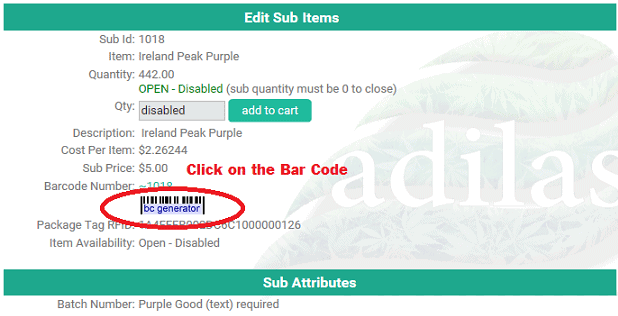
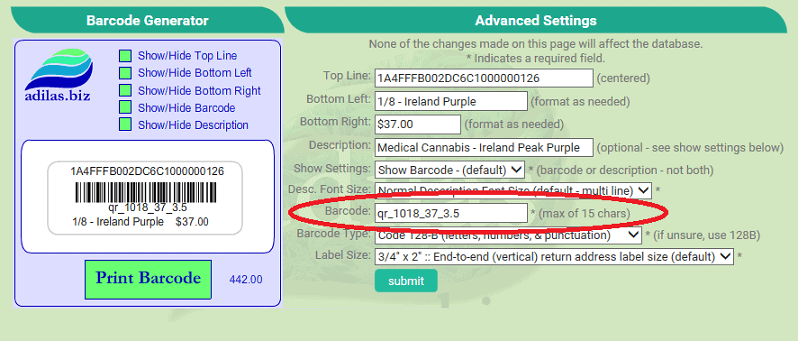
Add special code to tell the shopping cart Child – price and quantity
- In the bar code field, change the ~ to qr_.
- After the Child id, add _37 (or whatever selling price you require).
- After the price add _3.5 (or whatever quantity you desire).
- Completed bar code should look like this example:
- qr_1234_10_1.5
- Because of the qr_ when scanned, the bar code will now add the correct Child, price and quantity.
- Works great for prepackaging.
- If you exceed 15 chars, we can create a custom label using a QR Code.
First posted on the old news site: https://news.adilas.biz/2017/03/14/quick-response-bar-code/